




 10Web
10Web Instapage
 Access
 Dreamweaver
 Antigravity
 SQL Server
 dbForge Studio
 Portfolio
-
Latest Version
R for Windows 4.5.3 LATEST
-
Review by
-
Operating System
Windows 10 / Windows 11
-
User Rating
Click to vote -
Author / Product
-
Filename
R-4.5.3-win.exe
-
MD5 Checksum
7750801cb615cb463a8c027cf8fbf1dd
R for Windows is a free, open-source statistical computing and graphics software for PC, widely used for data analysis, machine learning, and statistical modeling.
Developed by the R Foundation, it provides a comprehensive environment for statistical computing and visualization.
The software supports various programming libraries, enabling users to perform complex data manipulations and create advanced graphical representations.
Key Features
Statistical Analysis – Supports a wide range of statistical techniques, including linear and nonlinear modeling, time-series analysis, classification, clustering, and hypothesis testing.
Data Visualization – Provides extensive tools for creating high-quality graphs and charts.
Extensive Library Support – Thousands of packages available for specialized tasks via CRAN (Comprehensive R Archive Network).
Script-based Automation – Automates tasks using scripts, making large-scale data analysis more efficient.
Cross-Platform Compatibility – Runs on Windows, Linux, and macOS, ensuring seamless integration across operating systems.
Community Support – Backed by a large community that regularly updates packages and provides extensive documentation.
What’s New
R for Windows uses a command-line interface (CLI) but is often paired with RStudio, a popular integrated development environment (IDE) that enhances usability.
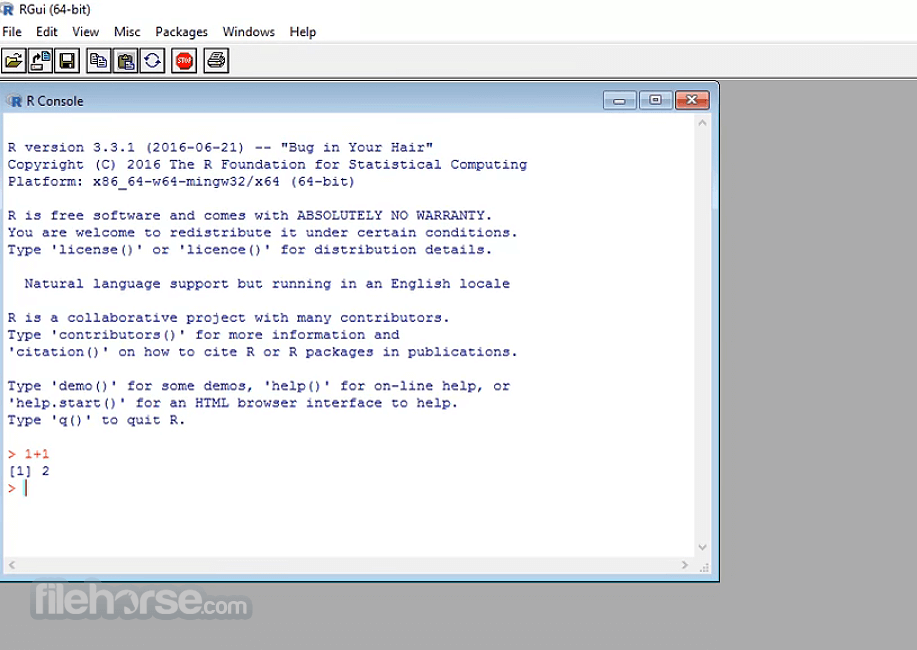
The default GUI, RGui, provides a simple interface with a console, editor, and help browser, but lacks modern usability features found in RStudio.
Installation and Setup
Is R for Windows free?
Yes, R is completely free and open-source.
Can R be used without RStudio?
Yes, it can run through RGui or even the command line, but RStudio provides a more user-friendly experience.
Does R require coding knowledge?
Basic knowledge of programming helps, but numerous online tutorials make it beginner-friendly.
How do I update R?
Download the latest version from the CRAN website and reinstall it.
Is R better than Python for data analysis?
It depends. R excels in statistical computing and visualization, whereas Python offers broader applications beyond data science.
Alternatives
Python (with Pandas, NumPy, Matplotlib) – A versatile language with strong data science libraries.
MATLAB – Ideal for numerical computing and engineering applications.
SPSS – Proprietary software for statistical analysis, widely used in research and social sciences.
Pricing
R for Windows is completely free and open-source, making it a budget-friendly option for students, researchers, and professionals.
System Requirements
R for Windows is a powerful tool for statistical analysis and data visualization, offering a vast ecosystem of libraries and community support. While it has a learning curve, particularly for users unfamiliar with programming, the combination of R and RStudio makes it a compelling choice for data scientists and analysts.
Whether you're conducting academic research, building machine learning models, or analyzing financial data, R remains a top-tier solution in the statistical computing landscape
Developed by the R Foundation, it provides a comprehensive environment for statistical computing and visualization.
The software supports various programming libraries, enabling users to perform complex data manipulations and create advanced graphical representations.
Key Features
Statistical Analysis – Supports a wide range of statistical techniques, including linear and nonlinear modeling, time-series analysis, classification, clustering, and hypothesis testing.
Data Visualization – Provides extensive tools for creating high-quality graphs and charts.
Extensive Library Support – Thousands of packages available for specialized tasks via CRAN (Comprehensive R Archive Network).
Script-based Automation – Automates tasks using scripts, making large-scale data analysis more efficient.
Cross-Platform Compatibility – Runs on Windows, Linux, and macOS, ensuring seamless integration across operating systems.
Community Support – Backed by a large community that regularly updates packages and provides extensive documentation.
What’s New
- New Fetch Tool: Introduced a curl-based alternative for downloading recommended packages, useful on systems without rsync or behind firewalls.
- Stronger C++ Validation: Improved checks for C++ standard settings with clearer warnings for invalid or conflicting configurations.
- Future C++ Support: Extended early support for the upcoming C++26 standard on Windows.
- Improved Package Cleanup Feedback: Cleanup errors during installation are now properly reported with warnings.
- Data Handling Fixes: Improved consistency in functions like all.equal() and model.frame() to avoid incorrect results.
- Better Date/Time Handling: Fixed issues with POSIX and Date objects, including length adjustments and structure display.
- Math & Statistical Accuracy: Improved precision in functions like besselJ() and bandwidth estimators in rare edge cases.
- Visualization Fixes: Corrected axis labeling, plot formatting, and positioning issues in graphical outputs.
- General Stability Improvements: Numerous bug fixes across core functions for more reliable and predictable behavior.
R for Windows uses a command-line interface (CLI) but is often paired with RStudio, a popular integrated development environment (IDE) that enhances usability.
The default GUI, RGui, provides a simple interface with a console, editor, and help browser, but lacks modern usability features found in RStudio.
Installation and Setup
- Download the installer from the CRAN website.
- Run the installer and follow the on-screen instructions.
- Choose a preferred installation directory.
- Once installed, launch RGui or integrate it with RStudio for a better experience.
- Running Commands: Open RGui or RStudio and use the console to execute commands (e.g., print("Hello, World!")).
- Installing Packages: Use install.packages("ggplot2") to add new functionalities.
- Data Importing: Load datasets using read.csv("file.csv") or read.table("file.txt").
- Data Visualization: Create plots with plot() or use advanced visualization libraries like ggplot2.
- Writing Scripts: Save your R commands in a script file (.R) and run them in RStudio for better reproducibility.
Is R for Windows free?
Yes, R is completely free and open-source.
Can R be used without RStudio?
Yes, it can run through RGui or even the command line, but RStudio provides a more user-friendly experience.
Does R require coding knowledge?
Basic knowledge of programming helps, but numerous online tutorials make it beginner-friendly.
How do I update R?
Download the latest version from the CRAN website and reinstall it.
Is R better than Python for data analysis?
It depends. R excels in statistical computing and visualization, whereas Python offers broader applications beyond data science.
Alternatives
Python (with Pandas, NumPy, Matplotlib) – A versatile language with strong data science libraries.
MATLAB – Ideal for numerical computing and engineering applications.
SPSS – Proprietary software for statistical analysis, widely used in research and social sciences.
Pricing
R for Windows is completely free and open-source, making it a budget-friendly option for students, researchers, and professionals.
System Requirements
- OS: Windows 7, 8, 10, or 11
- Processor: 64-bit processor recommended
- RAM: Minimum 2GB (4GB or more recommended for large datasets)
- Storage: At least 500MB of free space
- Free and open-source
- Extensive statistical and visualization capabilities
- Wide library support with CRAN packages
- Large and active community support
- Cross-platform compatibility
- Limited GUI functionality without RStudio
- Can be slow with very large datasets compared to Python or C++
- Requires manual package management and updates
R for Windows is a powerful tool for statistical analysis and data visualization, offering a vast ecosystem of libraries and community support. While it has a learning curve, particularly for users unfamiliar with programming, the combination of R and RStudio makes it a compelling choice for data scientists and analysts.
Whether you're conducting academic research, building machine learning models, or analyzing financial data, R remains a top-tier solution in the statistical computing landscape
Why is this app published on FileHorse? (More info)
-
R for Windows 4.5.3 Screenshots
The images below have been resized. Click on them to view the screenshots in full size.
 OperaOpera 129.0 Build 5823.28 (64-bit)
 Kling AIKling AI - Text or Image to Video
 PhotoshopAdobe Photoshop CC 2026 27.4 (64-bit)
 BlueStacksBlueStacks 10.42.167.1001
 OKXOKX - Buy Bitcoin or Ethereum
 CapCutCapCut 7.9.0
 PC RepairPC Repair Tool 2026
 Hero WarsHero Wars - Online Action Game
 TradingViewTradingView - Trusted by 100 Million Traders
 AdGuard VPNAdGuard VPN 2.9.0
Comments and User Reviews