



MariaDB, MySQL, MSSQL and PostgreSQL made easy!

HeidiSQL

HeidiSQL

  -  16.9 MB  -  Open Source
  • Latest Version

    HeidiSQL 12.15.0.7171 LATEST

  • Review by

    Daniel Leblanc

  • Operating System

    Windows 7 / Windows 8 / Windows 10 / Windows 11

  • User Rating

    Click to vote
  • Author / Product

    Ansgar Becker / External Link

  • Filename

    HeidiSQL_12.15.0.7171_Setup.exe

  • MD5 Checksum

    d9a8ef04a0b84ae78e2c297adfc2ab42

HeidiSQL is an open-source database management tool designed for Windows users who need an efficient way to manage MySQL, MariaDB, PostgreSQL, and Microsoft SQL Server databases.

It offers a user-friendly interface that allows developers and database administrators to browse, edit, and execute SQL scripts seamlessly.

HeidiSQL Screenshot 1

Initially developed by Ansgar Becker, HeidiSQL has grown into one of the most popular lightweight database management solutions.

Key Features

Multi-Database Support: It works with MySQL, MariaDB, PostgreSQL, and SQL Server, making it a versatile choice for database management.

Query Editor: A powerful SQL editor with syntax highlighting, auto-completion, and query history.

Data Import/Export: Supports importing and exporting databases in various formats, including CSV, SQL, and XML.

Database Synchronization: Allows synchronization between local and remote databases.

User Management: Provides a graphical user interface for managing user privileges and roles.

Table and Index Management: Enables the creation, modification, and deletion of tables and indexes.

Performance Monitoring: Offers real-time insights into database performance and query execution times.

SSH Tunneling: Securely connects to remote databases using SSH tunneling.

Customizable Interface: Allows users to adjust UI settings, themes, and shortcuts for a personalized experience.

User Interface

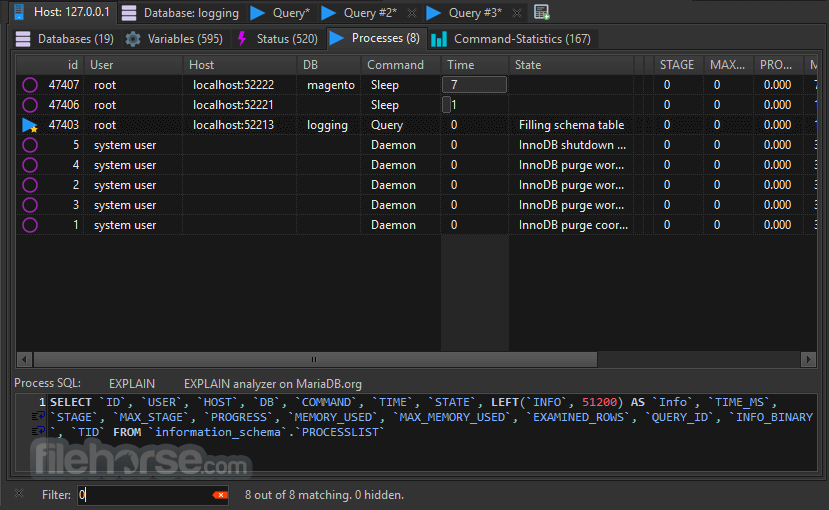
The app features a clean and organized interface designed for efficiency. The left-side panel displays the available databases and their respective tables, while the right-side panel provides a query editor and data view.
HeidiSQL Screenshot 2

The tabbed interface ensures that users can work on multiple queries simultaneously. Syntax highlighting and query auto-completion make SQL scripting more intuitive.

Installation and Setup
  • Download the latest version from the official website or FileHorse.
  • Run the installer and follow the setup wizard.
  • Choose database drivers for MySQL, MariaDB, PostgreSQL, or SQL Server.
  • Enter connection details, including hostname, username, password, and database.
  • Test the connection and save session settings for future use.
How to Use

Connect to a Database: Open HeidiSQL and create a new session with the required database credentials.

Browse Databases: Explore database schemas, tables, and views using the left-side navigation panel.

Execute Queries: Write SQL scripts in the editor and run queries with the execution button.

HeidiSQL Screenshot 3

Manage Tables: Add, modify, or delete tables and indexes directly through the GUI.

Export and Import Data: Use the data export/import feature to migrate data between different databases.

FAQs

Is HeidiSQL free to use?
Yes, this software is completely free and open-source.

Does HeidiSQL support remote database connections?
Yes, it allows remote database access via SSH tunneling and direct TCP/IP connections.

Can I use HeidiSQL on macOS or Linux?
No, this program is designed for Windows, but it can run on macOS and Linux using Wine.

Does HeidiSQL support stored procedures?
Yes, it allows users to view, edit, and execute stored procedures.

How does HeidiSQL compare to MySQL Workbench?
HeidiSQL is lighter and faster but lacks some advanced visualization features present in MySQL Workbench.

HeidiSQL Screenshot 4

Alternatives

MySQL Workbench – A more feature-rich tool with data modeling and visualization capabilities.

DBeaver – A multi-platform alternative supporting numerous database systems.

Navicat – A premium database management tool with a robust feature set.

SQLyog – A Windows-based MySQL GUI with enterprise-level features.

Pricing

This tool is 100% free and open-source, making it an excellent choice for developers and database administrators who require a cost-effective solution.

System Requirements
  • OS: Windows 7, 8, 10, or 11
  • Processor: Intel or AMD 1 GHz or faster
  • RAM: 2GB minimum (4GB recommended)
  • Storage: 50MB free disk space
  • Database Support: MySQL, MariaDB, PostgreSQL, Microsoft SQL Server
PROS
  • Lightweight and fast compared to other database tools.
  • Supports multiple database types.
  • Free and open-source with active community support.
  • User-friendly interface with syntax highlighting.
  • SSH tunneling for secure remote access.
CONS
  • Only available for Windows (requires Wine for macOS/Linux).
  • Lacks advanced visualization tools found in MySQL Workbench.
  • Does not support Oracle or other proprietary databases.
  • UI design is functional but lacks modern aesthetics.
  • Limited built-in reporting features.
Conclusion

HeidiSQL is an excellent choice for developers and database administrators looking for a lightweight, efficient, and free database management tool for Windows. With multi-database support, a powerful SQL editor, and seamless data import/export capabilities, it simplifies database operations while maintaining high performance.

Why is this app published on FileHorse? (More info)
  • HeidiSQL 12.15.0.7171 Screenshots

    The images below have been resized. Click on them to view the screenshots in full size.

    HeidiSQL 12.15.0.7171 Screenshot 1
  • HeidiSQL 12.15.0.7171 Screenshot 2
  • HeidiSQL 12.15.0.7171 Screenshot 3
  • HeidiSQL 12.15.0.7171 Screenshot 4
  • HeidiSQL 12.15.0.7171 Screenshot 5

What's new in this version:

Features:
- Add a few items to the top of the grid's header context menu
- Add a newer FreetTDS library for Windows, from the last successful VS 2022 build
- Make grid-highlight-same-text-color part of the predefined color schemes
- Switch color scheme from Tools main menu
- Introduce global AppColorSchemes for managing SQL and grid colors, and sync both with the app's dark mode (still only on Windows)
- Sync active line color and brace highlight with the app's dark or light mode
- Auto-switch to dark or light SQL colors in sync with the app's dark mode
- Support dark mode, using MetaDarkStyle from OPM, and provide the 3 known custom settings: automatic, light and dark
- Re-enable dropping files from file manager to "insert files to BLOB" dialog
- Upgrade DPI awareness to Per-Monitor v2, add TMainForm.FormChangeBounds as a replacement for the missing OnAfter/OnBeforeMonitorDpiChanged events
- Re-enable menu item on list header context menu: "Toggle visibility of all columns"
- Support European umlauts/accents as w (word char) in some regular expression areas
- Auto-uppercase keywords, data types and functions
- Recreate previous state of trigger after realizing the user edited code has errors
- Create a TSynEditMarkup descendant and use it for highlighting selected text occurrences
- Create custom setting so the user may define a terminal app himself, and auto-detect terminal app if the setting is yet empty
- Enable InnoSetup script for creating Windows installer
- Re-enable codepage => charset mapping using GetACP from DelphiCompat unit
- Re-enable ValidFilename function with platform specific lists of disallowed characters
- Re-enable support for hyperlinks in message dialogues, and use TTaskDialog again for simple messages on Windows
- Support portable mode with a portable.lock file in the app folder
- Re-enable hints on query result tabs
- Show connection details as a hint over status bar
- Add missing LCL translations, compiled to .mo files with msgfmt from Poedit with support for msgctxt
- Use the more native MessageDlg on all platforms when we don't need additional dialog features
- Show only mono-space fonts in SQL font selector
- Support compilation and usage on FreeBSD
- Include libssl 1.1 in macOS app bundle
- Include libmysql plugins in macOS app bundle
- Provide libmariadb plugins in macOS app bundle
- Assign OK button to Enter and Cancel button to Esc
- Add translation files to macOS app bundle
- Provide libmariadb in macOS app bundle
- Support SynEdit hints when mouse is over function names, tables etc

Enhancements:
- Turn two more TButtons into TBitBtn with icon
- Immediately show new log lines on heavy operations, enhancing user experience
- Turn export options button into TBitBtn and give it an arrow-down icon
- Indicate drop-down menu through arrow-down image on buttons
- Reduce width of left gutter in popup text editor
- Hide grid cell border lines in most VirtualStringTree's

Fixed:
- (ci) Get libqt6pas on ubuntu via 3rd party repo
- Remove MetaDarkStyle from the required packages
- ERangeError when editing text grid values which allow more than 2^31 chars, e.g. LONGTEXT
- Set default value for ThemeIsDark for cases where AppleInterfaceStyle does not exist (= light mode)
- Reload color scheme after auto-apply, reintroduce ThemeIsDark with a detection for Windows and macOS, use MetaDarkStyle units only on Windows
- Invalid typecast in List.Add(BaseForm.Components[i]), when running debug builds
- Wrong length of text detected (always 0)
- Crash in data grid when switching to an empty table on ArchLinux
- Next attempt to fix ERangeError crash in TBaseVirtualTree.UpdateVerticalRange
- Wrong ModalResult on "Replace all" button
- Increase too tight node height
- Auto fit columns in search-on-server results, taking the header caption into account
- Remove space eating gutter from SynEdit in search text dialog, disable scrollbars as long as not required
- Form dimensions reset to default values each time, and wrong check for empty SynEdit
- Confusion about modified default setting for DoubleClickInsertsNodeText, reset to old value
- Wrong BOM characters written to grid export files, when encoding is set to "UTF-8 BOM" for instance
- Auto-uppercase when pressing Enter immediately after a keyword
- Missing selection highlighting and auto-uppercasing in data tab filter editor
- Prevent triggers without quoted trigger name or table name from failing to be parsed (alexanderglueck)
- Convert usages of UnicodeString to String, in jsonregistry unit, and fix handling of Chinese characters
- Broken integers and floats after locale formatting on macOS
- Crash in file-picker with Windows path within Linux
- Some more compiler warnings and hints
- Missing top anchor control for new terminal edit box
- Missing SSHPASS environment variable when starting tunnel with sshpass -e
- Non working MySQL command line launcher, for all platforms
- A few more compiler hints and warnings
- Crash at right-click on data grid header
- Add missing dlls and MySQL plugin dlls for use on Windows, remove unused macOS dylibs
- Non working "Insert row" actions and its friends
- Stretched preview image, and image metadata label too small
- Ban Windows API code used in OnAdvancedHeaderDraw for painting column headers with sort chars
- Broken sort arrows in grid column header
- Fails to run netstat or netstat.exe on Windows, try a cross-platform socket approach
- Fix various compiler hints and warnings
- Crash when switching between tables
- Bad anchors on edit-variable dialog, overlapping/hiding radio buttons
- Conflicting grid edit shortcuts
- Crash in grid initializing, likely due to a wrong node height
- Compile error on Linux due to "identifier not found: LoadStringW"
- Translate button captions on TTaskDialog using LoadStringW on Windows
- Set MySQL plugins folder like in the classic branch
- No locale influence and no scientific notation in JSON reformatter
- Bad anchors on "start" tab of session manager, plus add an info label for portable users
- Set Screen.HintFont globally to what the editors use
- Do not show ugly/solid grid lines on macOS and Linux
- Prevent host sub-tabs from getting disabled on macOS
- Missing control anchors on create-database dialog
- Prevent editors from getting an empty font name
- Show file modification time in about dialog
- Skip harmless error when PG has no COLLATION_NAME in IS.COLUMNS
- Broken compiler conditionals
- Missing control anchors on copy-table dialog
- Set runtime search path for linker, so openssl finds libssl.1.1.dylib and we can access https pages now
- Missing control anchors on search/replace dialog
- Missing control anchors and tab order on column selector
- Wrong button positioning on macOS caused by differences of TButton/TBitBtn
- Search for translation files in the right folder within macOS app bundle
- Prefer TBitBtn over TSpeedButton for native look on macOS
- Assign no Syn highlighter by default and call it "Text", in texteditor
- Anchoring in about box
- Copy functions-*.ini files to the right folder, add iconset
- Sign and notarize exe file and dylibs on macOS, fix ini filenames
- Load libs from ../Frameworks on macOS
- Remove dead code

Refactor:
- Move grid null colors away from data types array to the new color scheme
- Rename TSynEditHelper.TextIsEmpty to HasText
- Move macOS build to Makefile

Styling:
- Remove no longer needed and partly dead code for DpiChange detection
- Remove dead code which is unlikely to get re-enabled in the future
- Remove non working context help button on session manager, we have a "general help" menu item in the "more" menu already
- Reduce borders around controls

Miscellaneous Tasks:
- Bump version to 12.15.1.1
- Revert to using include-packages, now that it checks LazCompatibility to exclude outdated/incompatible package files from installation
- Attempt to fix compilation of unwanted and outdated package files
- Attempt to fix broken dependency, use correct case of the package's DisplayName
- Mention current Lazarus version in readme file, mention usage for macOS builds and plans for v13
- Remove "Linux" from the Github release name, so I can have one release for all OS packages
- Move translation source file from master to lazarus branch
- Remove unused file extensions and add some others
- Set release compiler option -WM10.15 identically to debug, relevant for macOS
- Using the correct lazbuild
- And I had to forget one more, right?!?!
- Windows executables have .exe extension!!!
- Add Windows build to the matrix
- Switch back to upstream setup-lazarus
- Add macOS
- Test switching to forked setup-lazarus action
- Debugging missing columns from IS.COLUMNS on PG v16
- Remove dead code and calls: HasSizeGrip, FixControls, TranslateComponent, ConfirmIcon
- Adding support for QT6 CI/CD
- Dealing with end of line shenanigans
- Remove Transifex integration, prefer precompiled .mo files in extra/locale/
- Remove Wine hacks, now that we provide native Linux builds
- Remove notification for no longer created build updates
- Remove dead code
- Set linker rpath for all build modes
- Notarize macOS bundle only with --notarize argument, include team id
- Apply trivial change to remaining units complaining about CR/LF mixup