




 4K Download
 CleverGet
 PRTG
PRTG TrueNAS
 YTD Download
 WTFast
 Blip Transfer
 Keeprix
-
Latest Version
TeamViewer Portable 15.78.4 LATEST
-
Review by
-
Operating System
Windows 7 / Windows 8 / Windows 10 / Windows 11
-
User Rating
Click to vote -
Author / Product
-
Filename
TeamViewerPortable_15.78.4.paf.exe
-
MD5 Checksum
14ecf5a96399abad8ec079241107d2b2

Unlike the standard TeamViewer application, this portable version runs directly from a USB stick or other portable storage devices, making it a convenient tool for IT professionals, remote support technicians, and anyone who frequently works across multiple systems.
With TeamViewer Portable, users can establish secure connections to remote desktops, provide real-time support, and transfer files without leaving traces on the host machine.
This makes it ideal for troubleshooting, managing systems remotely, and collaborating with teams.
Features
No Installation Required – Runs directly from a USB drive or external storage, eliminating the need for installation.
Secure Remote Access – Uses end-to-end encryption for secure remote control sessions.
Cross-Platform Compatibility – Works seamlessly across Windows, macOS, Linux, Android, and iOS.
File Transfer – Allows fast and secure file sharing between connected systems.
Multi-User Support – Facilitates collaboration by enabling multiple users to connect to a single session.
Session Recording – Enables users to record remote sessions for future reference.
Remote Printing – Prints documents from the remote system to a local printer.
Wake-on-LAN – Wakes up a sleeping or powered-off computer remotely.
User Interface

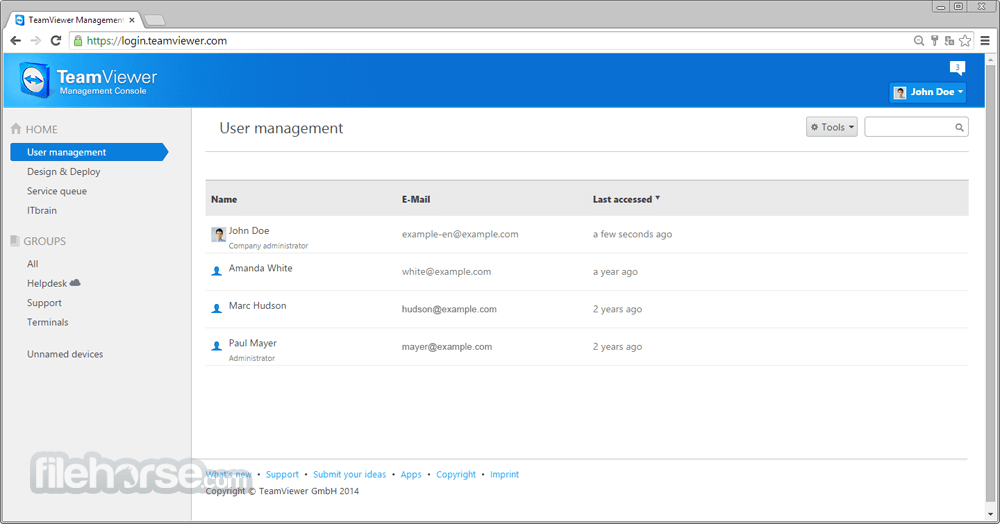
TeamViewer Portable retains the familiar, intuitive interface of the full TeamViewer application. The software presents a simple dashboard with sections for:
- Remote Control – Enter a partner ID to establish a connection.
- Meeting – Start or join online meetings with screen sharing.
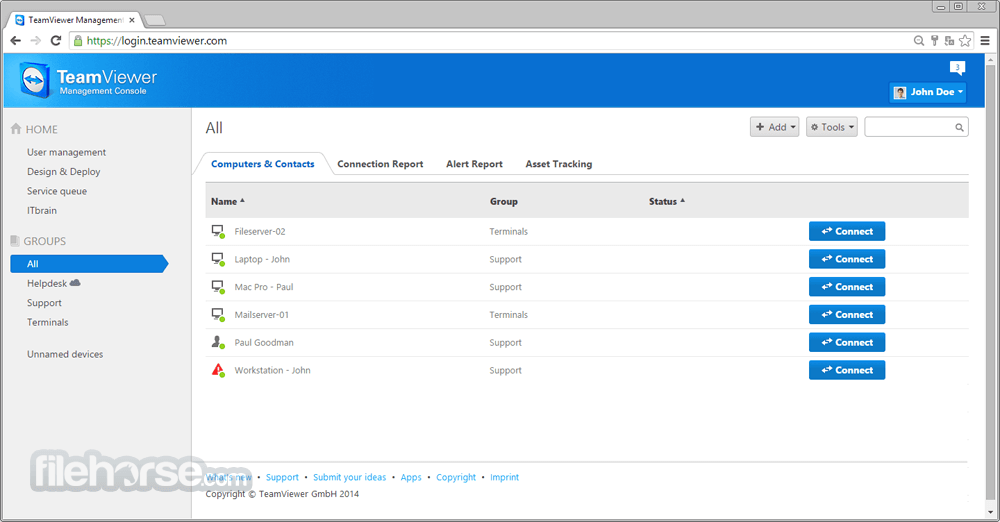
- Computers & Contacts – Manage saved devices and contacts for quick access.
- Chat & Messaging – Communicate with remote users during a session.
Installation and Setup
- Extract the ZIP file to a USB drive or any other location.
- Run the executable file (TeamViewer.exe) to launch the application.
- Accept the license agreement and configure any necessary settings.
- Enter the remote partner’s ID and connect securely.
- Since no installation is required, there is no registry modification, and the software can be used on any Windows PC directly.
- Launch TeamViewer Portable.
- Enter the Partner ID of the remote computer.
- Select “Remote Control” or “File Transfer” based on the intended task.
- Authenticate with the provided password or pre-configured credentials.
- Control the remote system as if you were sitting in front of it.
- Close the session when finished; no residual data is stored on the host computer.
FAQ
Is TeamViewer Portable free?
It is free for personal use but requires a commercial license for business use.
Can I use TeamViewer Portable without an internet connection?
No, an active internet connection is required for remote access.
Does TeamViewer Portable leave any files on the host computer?
No, it runs independently without installation, leaving no registry traces.
Is it as secure as the installed version?
Yes, it uses the same 256-bit AES encryption and security protocols.
Can I use TeamViewer Portable on macOS?
While the software is available for macOS, the portable version is primarily designed for Windows.
Alternatives
AnyDesk – A lightweight remote desktop tool with similar portability.
RemotePC – A business-focused alternative with cloud-based remote access.
Chrome Remote Desktop – A browser-based alternative for Google Chrome users.
UltraVNC – A free open-source remote access tool with basic features.
Microsoft Remote Desktop – Built into Windows for remote access but lacks portability.
Pricing
Free for personal use.
Commercial licenses start at approximately $50.90 per month for a business plan.
Additional enterprise features are available for higher-tier licenses.
System Requirements
- Operating System: Windows 7, 8, 10, 11 (32-bit and 64-bit)
- Processor: Dual-core CPU or higher
- RAM: Minimum 2GB (Recommended: 4GB+)
- Storage: 50MB of free space for extraction and temporary files
- Internet: Required for remote connections
- No installation required
- Easy to use with a simple interface
- Secure and encrypted connections
- Supports file transfer and session recording
- Works on low-spec computers
- Requires an internet connection for remote access
- Free version is limited for non-commercial use
- Lacks some advanced features of the full version
- Performance depends on network speed
- Cannot run in the background like the installed version
TeamViewer Portable is an excellent choice for IT professionals, tech support teams, and individuals who need on-the-go remote access without installation.
It delivers the same powerful features as the standard version while maintaining portability and security. The absence of an installation process makes it ideal for quick troubleshooting or working on shared/public computers.
Also Available: Download TeamViewer for Mac
-
TeamViewer Portable 15.78.4 Screenshots
The images below have been resized. Click on them to view the screenshots in full size.
-
-
-
-

What's new in this version:
Improved:
- Permissions inheritance has been improved, increasing reliability when permissions are assigned to user group managers
Fixed:
- a bug where 'Show details' button was not showing up on command bar upon selection of a device group
- a bug which was causing the legacy groups to disappear when applying hide offline filter in basic view
- a bug where devices were loading infinitely after login
- a bug which was causing crash in application
 OperaOpera 133.0 Build 5932.20 (64-bit)
 LDPlayerLDPlayer - Android Emulator
 PhotoshopAdobe Photoshop CC 2026 27.7 (64-bit)
 BlueStacks AIBlueStacks AI
 GTA 6GTA 6 for PS5
 CapCutCapCut Desktop 8.7.0
 PC RepairPC Repair Tool 2026
 Hero WarsHero Wars - Online Action Game
 TradingViewTradingView - Trusted by 100 Million Traders
 Forza HorizonForza Horizon 6
Comments and User Reviews