




 Day One
 PDFelement
 Transkriptor
 EasyClaw
 BookFab
 Adobe Acrobat
 Wispr Flow
 Genspark AI
-
Latest Version
Google Translate LATEST
-
Review by
-
Operating System
Windows 7 / Windows 8 / Windows 10 / Windows 11
-
User Rating
Click to vote -
Author / Product
Google Translate is an award-winning free multilingual machine translation service created by Google.
Used popularly as a web app and mobile utility, this Chrome browser extension takes the most commonly used features available in the full Google Translate suite of tools and makes the most commonly used ones available with a click of the mouse button.
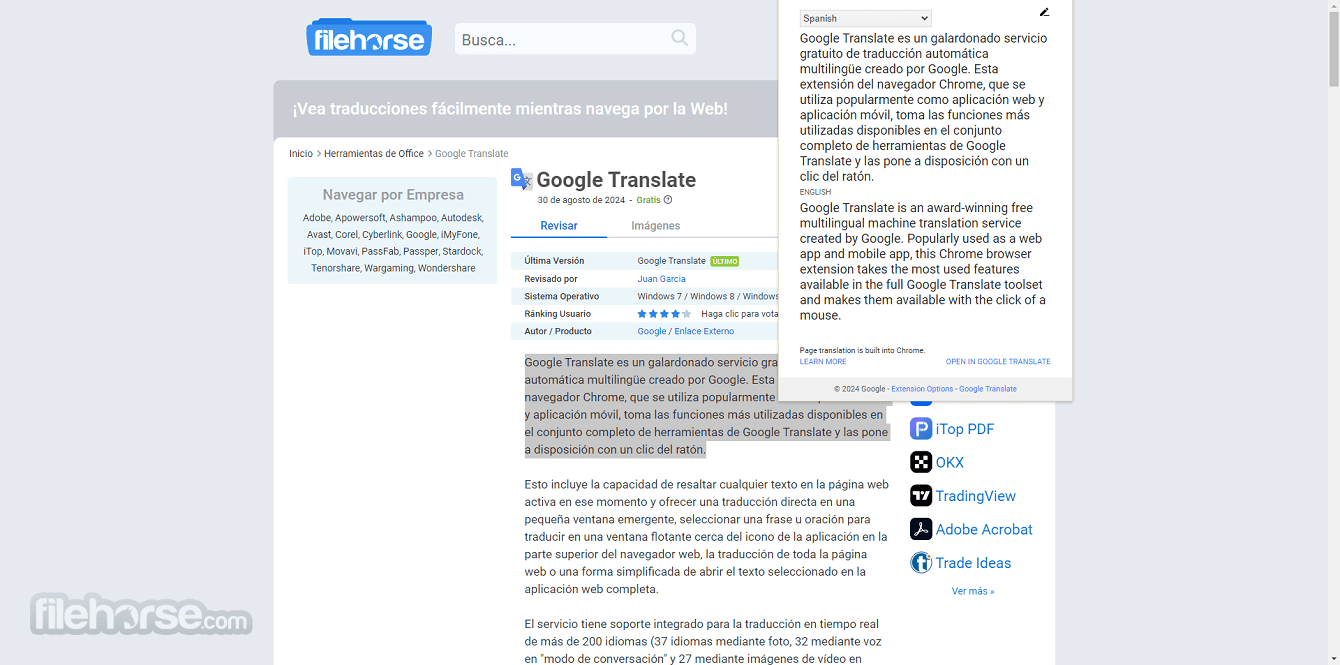
This includes the ability to highlight any text in your currently active webpage and offer direct translation in a small pop-up window, select a phrase or a sentence for translation in a floating window near the app icon on top of the web browser, translation of the entire webpage, or a streamlined way to open the selected text in the full web app.
The service supports around 250 languages and offers translation of text, speech, images, and live conversations. Its AI-powered Live Translate feature enables real-time speech-to-speech translation in more than 70 languages, while camera-based translation can recognize and translate text from photos and live camera views.
While the full web app supports advanced features such as speech translation, image translation, document translation, handwritten translation, and more, this Chrome extension is focused only on the translation of the selected text.
Google Translate is one of the world's most widely used translation services, offering text, image, document, website, and speech translation across a large number of languages. Its Chrome extension provides a convenient way to translate selected text directly while browsing, while full webpage translation is now handled natively by Chrome. The extension continues to receive updates, with version 2.0.17 released in July 2026.

Highlights
Since the processing of the translation service is done directly on the Google Cloud servers, the actual Google Translation extension that is installed into the Chrome browser can be lightweight and streamlined for fast use.
By simply clicking on the “Add to Chrome” button you will download and install small half a megabyte mini-app that will integrate itself into the browser and become ready to use via four methods: highlighting of a word or phrase that will cause the appearance of a pop-up translation, selection of text and choosing translate option via right-click dropdown menu, selection of text and clicking the Google Translate icon in the top-right section of the browser, and translating entire page by clicking on that same icon without any text being selected.

Inside pop-up windows that offer translated text, you can also access tools for changing input/output language, visit the full translate page, translate the entire page, or access extension options.
Since Google Translate is a web-based SaaS application, no installation is required for accessing the service on a PC. All you need is a web browser and an active internet connection.
For those who prefer mobile access, you can download the app from the Google Play Store or the Apple App Store. Installation is straightforward: download/install the app, open it, and you're ready to start translating.
Setting up language packs for offline use is as simple as selecting the desired languages in the settings menu and downloading the required data.
Key Features
User Interface
Google Translate’s web interface is designed for simplicity and ease of use. The main page is divided into two text boxes: one for inputting text in the source language and another for the translated output. A drop-down menu allows you to select the source and target languages.
Above the text boxes, users can toggle between text, speech, image, and document translation modes. The toolbar also features quick access buttons for copying the translation, listening to the translated text, and swapping the input/output languages.
On the left-hand side of the interface, it provides options for selecting previously saved translations from your Phrasebook. The design is clean, intuitive, and optimized for efficient translation workflows.
How to Use
Can Google Translate be used offline?
Yes, you can download language packs to use Google Translate offline on your mobile device.
Is Google Translate accurate?
Google Translate’s accuracy varies depending on the language pair and the complexity of the text. It excels with common languages and phrases but may struggle with idiomatic expressions or specialized jargon.
Can I translate documents with complex formatting?
It can handle documents while maintaining basic formatting. However, for documents with complex layouts, some formatting might be lost.
Is there a limit on the amount of text I can translate?
The web version allows up to 5,000 characters per translation. For larger texts, you'll need to split the content into smaller sections.
Is Google Translate free?
Yes, this webapp is free to use, both on the web and through the mobile app.
Alternatives
Microsoft Translator - Another powerful translation tool that supports over 100 languages and offers similar features, like text, voice, and image translation. Microsoft Translator is well-integrated with Microsoft Office products and supports collaborative translations.
DeepL Translator - Known for its high-quality translations, especially for European languages, DeepL offers more natural-sounding translations.
System Requirements
Web Version:
It stands out as a versatile and accessible translation tool for a wide range of users. Whether you need to translate simple text, engage in conversations in different languages, or even decode text within images, Google Translate for PC offers a comprehensive suite of features that make it indispensable.
While it’s not perfect and may stumble with nuanced language, its free access, vast language support, and ease of use make it a top choice for anyone looking to break down language barriers.
Also Available: Download Google Translate for Mac
Used popularly as a web app and mobile utility, this Chrome browser extension takes the most commonly used features available in the full Google Translate suite of tools and makes the most commonly used ones available with a click of the mouse button.
This includes the ability to highlight any text in your currently active webpage and offer direct translation in a small pop-up window, select a phrase or a sentence for translation in a floating window near the app icon on top of the web browser, translation of the entire webpage, or a streamlined way to open the selected text in the full web app.
The service supports around 250 languages and offers translation of text, speech, images, and live conversations. Its AI-powered Live Translate feature enables real-time speech-to-speech translation in more than 70 languages, while camera-based translation can recognize and translate text from photos and live camera views.
While the full web app supports advanced features such as speech translation, image translation, document translation, handwritten translation, and more, this Chrome extension is focused only on the translation of the selected text.
Google Translate is one of the world's most widely used translation services, offering text, image, document, website, and speech translation across a large number of languages. Its Chrome extension provides a convenient way to translate selected text directly while browsing, while full webpage translation is now handled natively by Chrome. The extension continues to receive updates, with version 2.0.17 released in July 2026.
Highlights
- The most popular and accurate machine language translation service.
- Developed by Google.
- Used by more than 600 million users every day.
- Support for over 200 languages.
- Fully integrated into the Chrome browser.
- Access translation by highlighting a single word, selecting a phrase or sentence, or translating an entire page.
- Choose the input/output languages manually, or let the app detect the source language.
- Hear translations with automated voice playback.
- Streamlined, fast, and lightweight.
- 100% FREE!
Since the processing of the translation service is done directly on the Google Cloud servers, the actual Google Translation extension that is installed into the Chrome browser can be lightweight and streamlined for fast use.
By simply clicking on the “Add to Chrome” button you will download and install small half a megabyte mini-app that will integrate itself into the browser and become ready to use via four methods: highlighting of a word or phrase that will cause the appearance of a pop-up translation, selection of text and choosing translate option via right-click dropdown menu, selection of text and clicking the Google Translate icon in the top-right section of the browser, and translating entire page by clicking on that same icon without any text being selected.
Inside pop-up windows that offer translated text, you can also access tools for changing input/output language, visit the full translate page, translate the entire page, or access extension options.
Since Google Translate is a web-based SaaS application, no installation is required for accessing the service on a PC. All you need is a web browser and an active internet connection.
For those who prefer mobile access, you can download the app from the Google Play Store or the Apple App Store. Installation is straightforward: download/install the app, open it, and you're ready to start translating.
Setting up language packs for offline use is as simple as selecting the desired languages in the settings menu and downloading the required data.
Key Features
- Text Translation: Translate text instantly between 200 languages.
- Speech Translation: Real-time voice translation in 32 languages, making it ideal for live conversations.
- Image Translation: By using your device's camera, you can translate text within images, signs, and menus in 37 languages.
- Document Translation: Supports the translation of entire documents (e.g., PDFs, Word files) into different languages, maintaining formatting.
- Website Translation: Translate entire web pages by entering the URL, available in multiple languages.
- Offline Mode: Download language packs for offline translation when you don't have internet access.
- Phrasebook: Save frequently used translations for quick access later.
- Handwriting Input: For non-Latin languages, it allows users to write characters directly, translating them into the desired language.
- Cross-Platform Sync: Save your translation history and access it across devices when logged in with your Google account.
- Text Translation – Translate text across 200+ supported languages on the web and in the mobile app.
- Camera & Image Translation – Translate text instantly through your phone’s camera or from saved images, including signs, menus, and handwritten notes.
- Live Conversation Translation – Translate spoken conversations in near real time, with support for both speaker-to-speaker conversations and listening modes.
- Offline Translation – Download supported language packs and translate text and camera content without an internet connection.
- Document Translation – Translate DOCX, PDF, PPTX, and XLSX files directly through the web version.
- Website Translation – Translate entire websites by entering their URL, with the option to switch between the original and translated versions.
- Speech Translation & Transcription – Translate spoken words through a microphone and listen to translated text aloud.
- AI-Powered Language Practice – Practice real-life conversations with AI through personalized listening and speaking exercises tailored to your goals and proficiency level.
- Tap to Translate – Translate text from other apps without having to switch back and forth between applications.
User Interface
Google Translate’s web interface is designed for simplicity and ease of use. The main page is divided into two text boxes: one for inputting text in the source language and another for the translated output. A drop-down menu allows you to select the source and target languages.
Above the text boxes, users can toggle between text, speech, image, and document translation modes. The toolbar also features quick access buttons for copying the translation, listening to the translated text, and swapping the input/output languages.
On the left-hand side of the interface, it provides options for selecting previously saved translations from your Phrasebook. The design is clean, intuitive, and optimized for efficient translation workflows.
How to Use
- Text Translation: Open this app on your web browser. Enter your text in the left box, select the source and target languages, and the translation will appear instantly in the right box.
- Speech Translation: Click on the microphone icon and speak directly into your device. It will transcribe and translate your speech in real-time.
- Image Translation: Select the camera icon, upload an image, or use your device's camera to capture text. It will detect and translate the text within the image.
- Document Translation: Upload a document (PDF, DOCX) by clicking the "Documents" tab. It will process and translate the content while retaining the original formatting.
- Website Translation: Enter the website URL in the appropriate field, and Google Translate will display the entire website in the selected language.
Can Google Translate be used offline?
Yes, you can download language packs to use Google Translate offline on your mobile device.
Is Google Translate accurate?
Google Translate’s accuracy varies depending on the language pair and the complexity of the text. It excels with common languages and phrases but may struggle with idiomatic expressions or specialized jargon.
Can I translate documents with complex formatting?
It can handle documents while maintaining basic formatting. However, for documents with complex layouts, some formatting might be lost.
Is there a limit on the amount of text I can translate?
The web version allows up to 5,000 characters per translation. For larger texts, you'll need to split the content into smaller sections.
Is Google Translate free?
Yes, this webapp is free to use, both on the web and through the mobile app.
Alternatives
Microsoft Translator - Another powerful translation tool that supports over 100 languages and offers similar features, like text, voice, and image translation. Microsoft Translator is well-integrated with Microsoft Office products and supports collaborative translations.
DeepL Translator - Known for its high-quality translations, especially for European languages, DeepL offers more natural-sounding translations.
System Requirements
Web Version:
- A modern web browser (Chrome, Firefox, Edge, Safari)
- Internet connection
- Android: Android 5.0 and up
- iOS: iOS 12.0 or later
- Free to use
- Supports over 200 languages
- Cross-platform accessibility
- Multiple translation modes (text, speech, image, document)
- Offline capabilities for mobile
- Accuracy can vary, especially with less common languages or complex sentences
- Limited offline functionality compared to online features
- Translations may lack contextual understanding in some cases
It stands out as a versatile and accessible translation tool for a wide range of users. Whether you need to translate simple text, engage in conversations in different languages, or even decode text within images, Google Translate for PC offers a comprehensive suite of features that make it indispensable.
While it’s not perfect and may stumble with nuanced language, its free access, vast language support, and ease of use make it a top choice for anyone looking to break down language barriers.
Also Available: Download Google Translate for Mac
Why is this app published on FileHorse? (More info)
-
Google Translate Screenshots
The images below have been resized. Click on them to view the screenshots in full size.
-
-
-
-

 OperaOpera 135.0 Build 5973.92 (64-bit)
 LDPlayerLDPlayer - Android Emulator
 PhotoshopAdobe Photoshop CC 2026 27.9.1 (64-bit)
 MalwarebytesMalwarebytes Premium 5.7.0
 GTA 6GTA 6 for PS5
 CapCutCapCut Desktop 9.3.0
 PC RepairPC Repair Tool 2026
 Hero WarsHero Wars - Online Action Game
 TradingViewTradingView - Trusted by 100 Million Traders
 How to FishHow to Fish
Comments and User Reviews