




 Adobe Acrobat
 BookFab
 PDFelement
 WPS Office
 Edraw AI
 Genspark AI
-
Latest Version
Tungsten OmniPage 19.2 LATEST
-
Review by
-
Operating System
Windows 7 / Windows 8 / Windows 10 / Windows 11
-
User Rating
Click to vote -
Author / Product
-
Filename
omnipage-ultmate-trial.exe
Tungsten OmniPage (formerly Kofax OmniPage) is a fully-featured optical character recognition (OCR) application and a document management software that can effortlessly recognize the written word from your physical or digital documents, and enable you to take control over this new recording with a large array of highly capable tools that can satisfy not only individual users but also business offices of considerable size.

To better help you manage your business needs, OmniPage Professional can also do a wide array of automated tasks, such as converting files from your email account, distributing finished scanned documents to your network, and even archiving them into Microsoft SharePoint.
With integrated support for all modern scanners, the ability to recognize text and formatting styles with ease and almost zero typos, and even its praised support for scanning locked-down PDF files, Tungsten OmniPage OCR software is today regarded as one of the most popular OCR suites.
Main Features
Advanced OCR Technology — Accurately converts scanned documents and PDFs into editable text files.
High Recognition Accuracy — Preserves original formatting, tables, columns, and layouts.
Batch Processing — Convert multiple documents at once to save time.
Automated Workflows — Create custom workflows for repetitive document conversion tasks.
Wide Format Support — Export to Word, Excel, PDF, HTML, and other popular formats.
Cloud Integration — Connect with services like SharePoint, OneDrive, and other cloud platforms.
Language Recognition — Supports recognition of multiple international languages.
PDF Editing & Conversion — Convert PDFs into fully searchable and editable documents.
Scanner Integration — Directly capture and process documents from connected scanners.
Enterprise-Level Performance — Designed for high-volume document processing environments.

User Interface
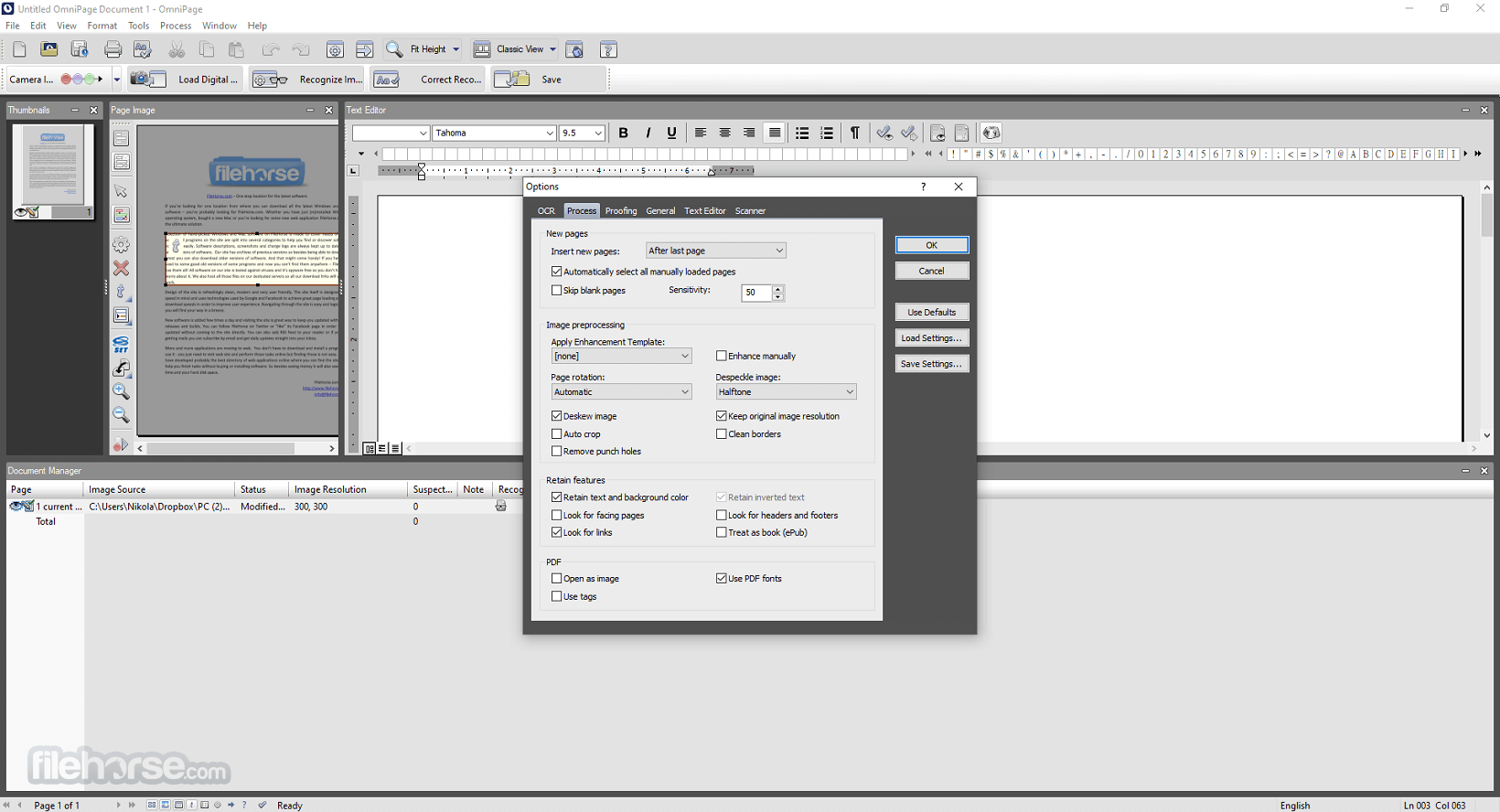
OmniPage features a professional and structured interface designed for efficient document processing. The layout typically includes a central document preview pane, a thumbnail panel for page navigation, and a toolbar with quick access to OCR, conversion, and export tools.
Workflow options and recognition settings are clearly organized, allowing users to customize processing steps with ease. The interface is optimized for both individual users and enterprise environments, focusing on productivity and clarity rather than visual complexity.
How to Use
What is Tungsten OmniPage used for?
Tungsten OmniPage is a professional Optical Character Recognition (OCR) software designed to convert scanned documents, PDFs, and images into editable digital formats. It is commonly used in business environments to digitize paper documents and improve document management workflows.
What file formats does OmniPage support?
OmniPage supports a wide range of output formats, including Microsoft Word (DOCX), Excel (XLSX), searchable PDF, plain text, and other common document types. It is designed to preserve original layout, formatting, and tables during conversion.
Is OmniPage suitable for enterprise use?
Yes. OmniPage is often used in corporate and government environments where high-volume document conversion and automation are required. It supports batch processing and integration with document management systems.
How accurate is OmniPage’s OCR?
OmniPage is known for high OCR accuracy, particularly with clean, high-resolution scans. Accuracy depends on document quality, language, and formatting complexity, but it is considered a reliable professional OCR solution.
Is Tungsten OmniPage still relevant in 2026?
Yes. In 2026, OmniPage remains relevant for organizations that need desktop-based OCR with advanced automation features. While cloud-based OCR tools exist, OmniPage continues to be valued for local processing, control over data, and enterprise integration options.

Pricing
OmniPage Standard - $149
PROS
- The industry’s leading optical character recognition (OCR) technology.
- Empower Your Teams to Be More Productive with OCR
- Supports recurring conversion jobs with the push of a button!
To better help you manage your business needs, OmniPage Professional can also do a wide array of automated tasks, such as converting files from your email account, distributing finished scanned documents to your network, and even archiving them into Microsoft SharePoint.
With integrated support for all modern scanners, the ability to recognize text and formatting styles with ease and almost zero typos, and even its praised support for scanning locked-down PDF files, Tungsten OmniPage OCR software is today regarded as one of the most popular OCR suites.
Main Features
Advanced OCR Technology — Accurately converts scanned documents and PDFs into editable text files.
High Recognition Accuracy — Preserves original formatting, tables, columns, and layouts.
Batch Processing — Convert multiple documents at once to save time.
Automated Workflows — Create custom workflows for repetitive document conversion tasks.
Wide Format Support — Export to Word, Excel, PDF, HTML, and other popular formats.
Cloud Integration — Connect with services like SharePoint, OneDrive, and other cloud platforms.
Language Recognition — Supports recognition of multiple international languages.
PDF Editing & Conversion — Convert PDFs into fully searchable and editable documents.
Scanner Integration — Directly capture and process documents from connected scanners.
Enterprise-Level Performance — Designed for high-volume document processing environments.
User Interface
OmniPage features a professional and structured interface designed for efficient document processing. The layout typically includes a central document preview pane, a thumbnail panel for page navigation, and a toolbar with quick access to OCR, conversion, and export tools.
Workflow options and recognition settings are clearly organized, allowing users to customize processing steps with ease. The interface is optimized for both individual users and enterprise environments, focusing on productivity and clarity rather than visual complexity.
How to Use
- Install and launch OmniPage on your computer.
- Import a scanned document, image file, or PDF.
- Select the document recognition (OCR) settings.
- Choose the appropriate language for accurate text recognition.
- Click Convert or Recognize to process the document.
- Review and edit the recognized text if needed.
- Select the desired output format (Word, Excel, PDF, etc.).
- Save or export the converted file to your preferred location.
What is Tungsten OmniPage used for?
Tungsten OmniPage is a professional Optical Character Recognition (OCR) software designed to convert scanned documents, PDFs, and images into editable digital formats. It is commonly used in business environments to digitize paper documents and improve document management workflows.
What file formats does OmniPage support?
OmniPage supports a wide range of output formats, including Microsoft Word (DOCX), Excel (XLSX), searchable PDF, plain text, and other common document types. It is designed to preserve original layout, formatting, and tables during conversion.
Is OmniPage suitable for enterprise use?
Yes. OmniPage is often used in corporate and government environments where high-volume document conversion and automation are required. It supports batch processing and integration with document management systems.
How accurate is OmniPage’s OCR?
OmniPage is known for high OCR accuracy, particularly with clean, high-resolution scans. Accuracy depends on document quality, language, and formatting complexity, but it is considered a reliable professional OCR solution.
Is Tungsten OmniPage still relevant in 2026?
Yes. In 2026, OmniPage remains relevant for organizations that need desktop-based OCR with advanced automation features. While cloud-based OCR tools exist, OmniPage continues to be valued for local processing, control over data, and enterprise integration options.
Pricing
OmniPage Standard - $149
- Supports recurring conversion jobs with the push of a button
- Delivers built-in workflows or lets you create your own
- Full support for Microsoft Office, Corel WordPerfect, HTML, and more
- Compatible with Windows 10, 8, 7, and XP (SP3)
- Transform PDF files into documents users can edit, share, or archive
- Offers superior accuracy, support for virtually any scanner, and automatic document routing
- Compatible with Windows 11, 10, 8, 7, and XP (SP3)
- OS: Windows 10 (32-bit or 64-bit), Windows 8.1 (32-bit or 64-bit), Windows 7 (32-bit or 64-bit) with Service Pack 1
- CPU: Intel Pentium 4 or higher (Dual-core or Quad-core recommended)
- GPU: 1024 x 768 display resolution, 16-bit color or higher video card
- RAM: 1 GB RAM (2 GB recommended for better performance)
- Disk Space: 1.0 GB free hard disk space + 50 MB working space during installation
PROS
- Accurate OCR: Tungsten OmniPage (formerly Kofax OmniPage) is known for its high accuracy in recognizing text and characters from scanned documents, making it an excellent choice for businesses and individuals who need reliable OCR capabilities.
- Wide Range of Input Formats: It can handle a variety of input formats, including scanned paper documents, PDFs, and image files, allowing you to convert documents from multiple sources into editable text.
- Batch Processing: It supports batch processing, which means you can process multiple documents simultaneously, saving time and increasing efficiency.
- Document Formatting: The software retains the original formatting of the document, including fonts, layouts, and graphics, making it suitable for preserving the visual appearance of the original document.
- Integration: It offers integration with other software and services, such as document management systems, cloud storage providers, and workflow automation tools, allowing for seamless document processing and distribution.
- Multilingual Support: It supports a wide range of languages and can recognize text in multiple languages, making it suitable for international users.
- Document Management: The software includes features for organizing, indexing, and managing digitized documents, making it easier to find and retrieve information.
- Cost: It can be relatively expensive, especially for small businesses or individuals on a tight budget.
- Learning Curve: While it offers a wide range of features, the software may have a steeper learning curve for beginners or those not familiar with OCR software.
- Resource Intensive: It can be resource-intensive, requiring a powerful computer to run efficiently, especially when processing large batches of documents.
- Limited Free Trial: The free trial version may have limitations in terms of features or the number of pages you can process before needing to purchase a full license.
- Support and Updates: The quality of customer support and frequency of software updates can vary, so it's essential to research and consider ongoing support and maintenance when purchasing.
- Licensing Models: Depending on your needs, the licensing models may not be flexible enough to accommodate your specific usage scenarios, which can affect the cost-effectiveness of the software.
Why is this app published on FileHorse? (More info)
-
Tungsten OmniPage 19.2 Screenshots
The images below have been resized. Click on them to view the screenshots in full size.
-
-

-
-
 OperaOpera 129.0 Build 5823.28 (64-bit)
 Kling AIKling AI - Text or Image to Video
 PhotoshopAdobe Photoshop CC 2026 27.4 (64-bit)
 BlueStacksBlueStacks 10.42.167.1001
 OKXOKX - Buy Bitcoin or Ethereum
 CapCutCapCut 7.9.0
 PC RepairPC Repair Tool 2026
 Hero WarsHero Wars - Online Action Game
 TradingViewTradingView - Trusted by 100 Million Traders
 AdGuard VPNAdGuard VPN 2.9.0
Comments and User Reviews