




 SQL Server
 OnSpace AI
 Lovable
 Antigravity
 Replit
 Windsurf
 10Web
10Web Cursor
-
Latest Version
Stencyl 4.2.0 LATEST
-
Review by
-
Operating System
Windows 7 / Windows 8 / Windows 10 / Windows 11
-
User Rating
Click to vote -
Author / Product
-
Filename
Stencyl-4.2.0.zip
-
MD5 Checksum
94377f60ca6edb6180a3b8ea94b80f5b
Stencyl isn't your average game creation app; it's a gorgeous, intuitive toolset that accelerates your workflow and then gets out of the way. It takes care of the essentials, so you can focus on what's important - making your game yours.
Publish iPhone, iPad, Android, Windows, Mac, Linux & Flash games without code! Join the 500,000 developers who have adopted the tool.
Stencyl for PC is a powerful and user-friendly game development platform designed for both beginners and experienced game developers.
With Stencyl, you can create interactive and visually appealing games for various platforms, including Windows, macOS, iOS, Android, and more. This software combines a visual game builder with a versatile coding environment, making game development accessible to users of all skill levels.
The best app games have reached top slots in the App Store and Google Play while being featured under the "Best New Game" section under their respective stores. Best web games have been sponsored by major publishers such as ArmorGames, Kongregate, and Newgrounds.
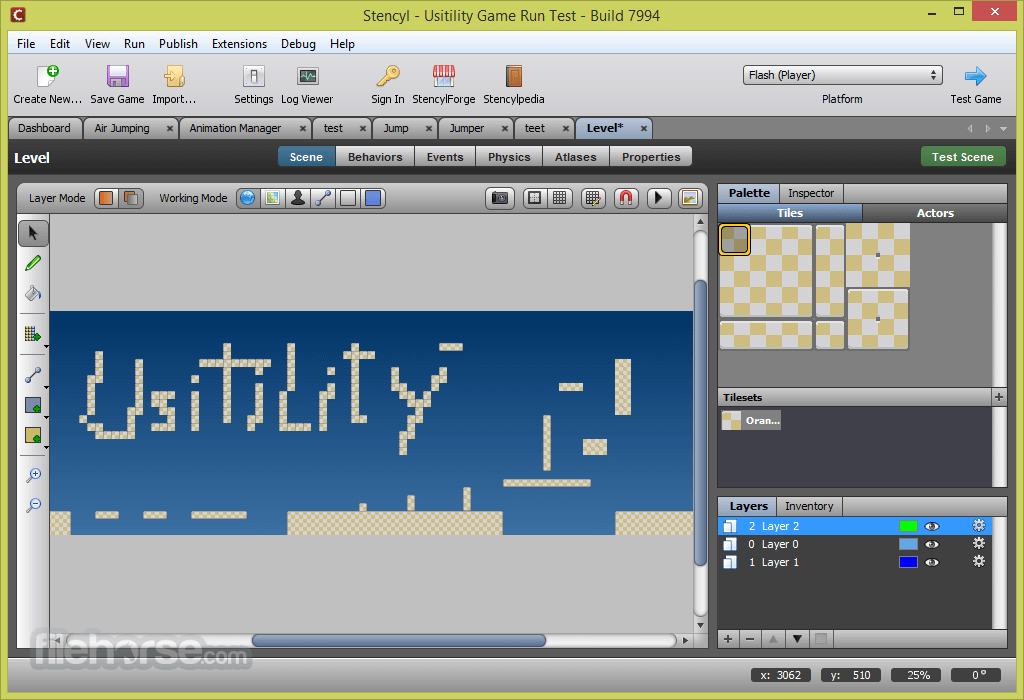
If you're used to graphics editors like Photoshop, you'll feel right at home in the Scene Designer. Familiar features, such as a selection tool, zooming, grid-snapping, and flood fill, will help you quickly craft complex worlds out of Actors, Tiles, and Terrain.
With extensive platform support, you can rest assured that all players will have access to your game.
Today, Sten cyl supports:
- iOS (iPhone/iPad)
- Android
- Windows
- Mac
- Linux
- Flash
- HTML5 (experimental)

Main Features
Drag-and-Drop Game Design: Stencyl's intuitive drag-and-drop interface allows users to create game logic, levels, and characters without writing a single line of code. This feature is particularly beneficial for beginners and artists.
Behavior Editor: For those who prefer coding, it provides a behavior editor that uses a visual programming language called "blocks." It's similar to Scratch or Blockly and lets you create custom game behaviors.
Cross-Platform Development: It enables developers to export their games to various platforms, including Windows, macOS, iOS, Android, HTML5, and more, ensuring a broad reach for your games.
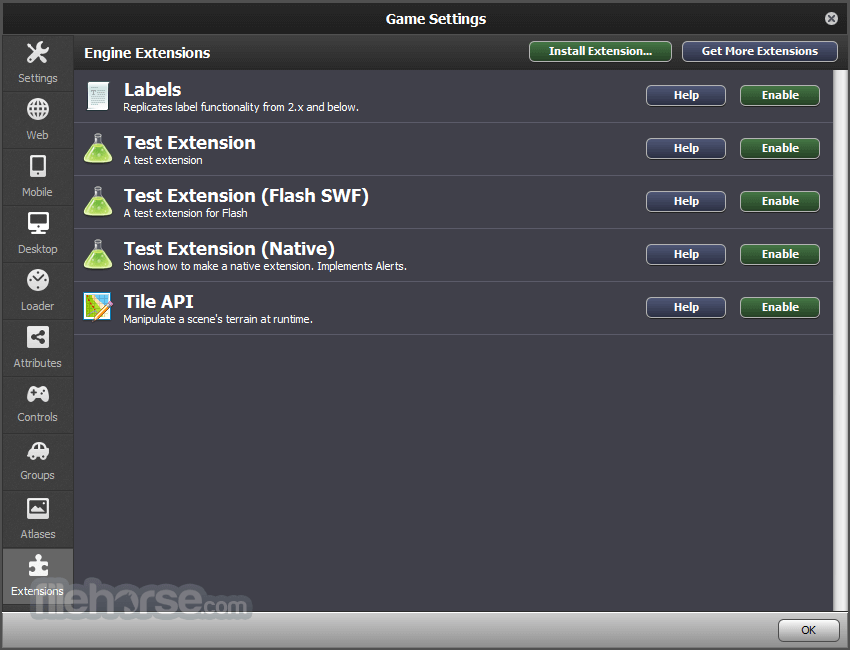
Asset Library: The software comes with a built-in asset library, offering a wide range of pre-designed characters, objects, and backgrounds. Users can also import their own assets or purchase additional ones from the marketplace.
Physics Engine: It integrates a robust physics engine, making it easier to create realistic movement, collision detection, and simulations in your games.
Collaboration Tools: Developers can collaborate seamlessly by working on the same project simultaneously or sharing their games with others for feedback and testing.
Real-Time Testing: It provides real-time testing on multiple devices, allowing developers to see how their games perform on various platforms while making adjustments accordingly.
Monetization Support: The platform supports various monetization methods, including in-app purchases, ads, and premium game sales, making it suitable for both hobbyists and professional game developers.
What’s New
- Fixed an error occurring when viewing logged images with missing data in the toolset.
- Prevented iOS simulators from appearing as launch targets for builds intended for real iOS devices, and vice versa.
- Filtered out iOS devices whose OS version is below the game’s required minimum SDK.
- Added support for automatically compiling simple toolset extensions from source when no dependencies are required.
User Interface
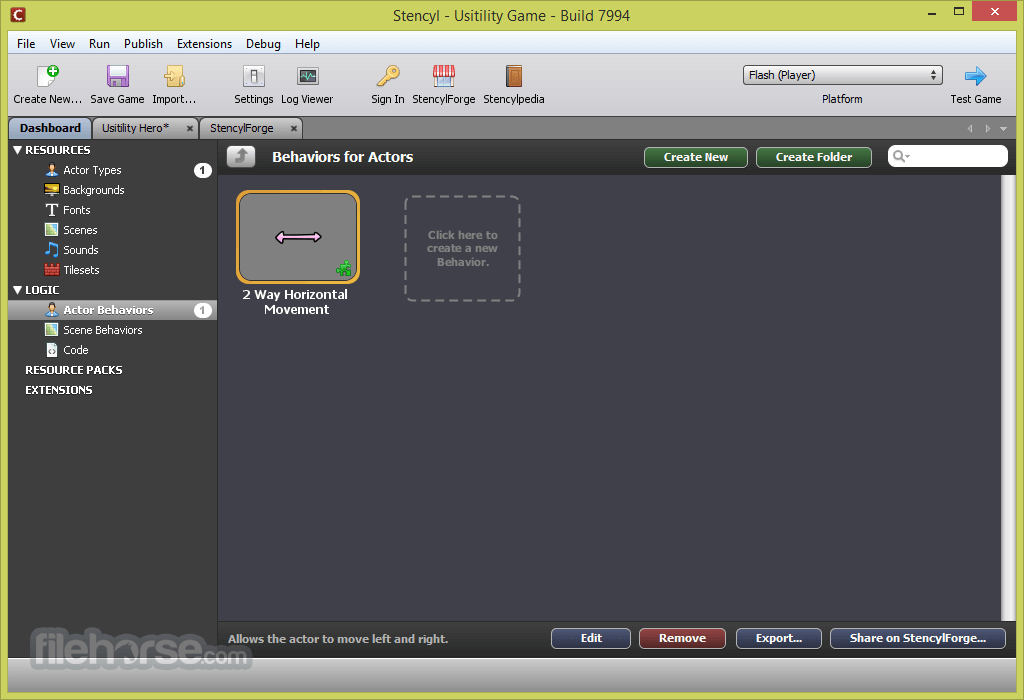
Stencyl's user interface is clean and well-organized. The workspace is divided into multiple tabs for scene editing, behavior creation, asset management, and code writing.
The drag-and-drop interface is particularly intuitive, making it easy for newcomers to get started. For experienced developers, the code editor is available, providing a more traditional approach to game development.
Installation and Setup
Installing the program is straightforward. Simply download the installer from their official website or FileHorse, run it, and follow the on-screen instructions.
The app setup process is smooth, and you'll be prompted to select additional components and target platforms during installation. Once installed, it offers a guided tutorial for beginners to get acquainted with the software.
How to Use
- Create a New Game: Start by creating a new game project and selecting your target platform.
- Design Your Game: Use the drag-and-drop interface to create scenes, add characters, objects, and backgrounds to your game.
- Set Behaviors: Add behaviors to your game elements using either the visual block editor or write custom code if you prefer.
- Test Your Game: It provides real-time testing on various platforms. Test your game to identify and fix any issues.
- Export Your Game: Once you're satisfied with your game, export it to your chosen platform or share it with others for testing and feedback.
Can I export my Stencyl games to consoles like PlayStation or Xbox?
It primarily supports export to desktop and mobile platforms, but exporting to consoles may require additional licensing and development agreements.
Is Stencyl FREE to use?
It offers a free version with limited features and watermarked exports. To access advanced features and remove watermarks, you can subscribe to their paid plans, starting at $15 per month.
What programming languages can I use in Stencyl?
It primarily uses its visual block editor for behavior scripting, but it also supports coding in Haxe, allowing experienced developers to write custom scripts.
Can I publish my Stencyl games to online game portals?
Yes, you can export your games to HTML5, which makes it possible to publish your games on online portals like Kongregate and Newgrounds.
Is Stencyl suitable for 3D game development?
Stencyl is primarily designed for 2D game development. While it has some limited 3D capabilities, it's not the ideal choice for complex 3D games.
Alternatives
Unity - A powerful and versatile game development platform suitable for both 2D and 3D games. It offers a vast community and asset store.
Godot Engine - An open-source game engine that supports 2D and 3D game development. It's known for its flexibility and ease of use.
Construct 3 - A browser-based game development platform with a focus on visual scripting and 2D game creation.
GameMaker Studio - A popular game development platform that caters to both beginners and professionals, offering 2D and limited 3D capabilities.
Cocos Creator - An open-source, C++ based framework for developing cross-platform 2D games with a strong focus on mobile.
Pricing
Free: Limited features, watermarked exports.
Indie: Starts at $15 per month, removes watermarks, and offers more advanced features.
Studio: Starts at $99 per year, provides additional features, and commercial use rights.
Studio Pro: Custom pricing for larger teams and enterprise-level features.
PROS
- User-friendly drag-and-drop interface.
- Cross-platform game development support.
- Real-time testing on various devices.
- A strong community and marketplace for assets.
- Suitable for both beginners and experienced developers.
- Affordable pricing options.
- Limited 3D capabilities.
- Advanced features are locked behind paid plans.
- Console export may require additional licensing.
- Less suitable for complex and large-scale projects.
Stencyl is an excellent choice for game developers looking to create 2D games without the steep learning curve of traditional game engines. Its user-friendly interface, versatile coding options, and cross-platform support make it a valuable tool for hobbyists, indie developers, and small studios.
While it may have some limitations, especially for those interested in 3D game development, Stencyl's affordability and accessibility make it a compelling option for a wide range of game creators. Whether you're just starting or looking to streamline your development process, Stencyl for PC is a platform worth considering for your game development journey.
Note: In the demo version, publishing to Flash, Windows, Mac (App Store), and Linux is disabled. Watermark on some output files.
Also Available: Download Stencyl for Mac
-
Stencyl 4.2.0 Screenshots
The images below have been resized. Click on them to view the screenshots in full size.
-
-
-
-

What's new in this version:
OS/Environment Support:
- Removed the dependency on Rosetta for arm64 macOS
- Added support for Wayland (Using XWayland for toolset, Wayland for engine)
- Java 21 -> 25
- Fix OS version detection for version strings with qualifiers (such as debian with 6.11.10+bpo-amd64)
Tools:
- Haxe 4.2.1 -> 4.3.7
- Neko 2.3.0 -> 2.4.1
- Hxcpp 4.2.1 -> 4.3.123
- Lime 8.0.1 -> 8.3.0
- Hxp 1.2.2 -> 1.3.1
Launcher:
- [all] Fixed errors related to weak DH ciphers by updating the server (https://community.stencyl.com/index.php?issue=2249.0)
- [windows] Fix errors launching Stencyl if msys2/cygwin is installed (Always use absolute path to System32 binaries, including find, curl, and tar)
- [windows] Fix Windows launcher error when JDK is not yet installed (Enforce windows line endings to avoid errors when a label spans a block boundary)
- [windows] Fix Windows launcher error when JDK is not yet installed and a proxy or firewall causes ssl revocation server to be unreachable
- [linux] Don't immediately close terminal after an error occurs
Logs:
- Don't print "failed to load behavior-events.lang" in logs
- Write log output with colors (red for errors, yellow for warnings) unless the NO_COLOR environment variable is present
UI:
- [linux] Fix botched anti-aliasing of labels on SourceList components (e.g. dashboard sidebar)
- [linux] Fix flickering button graphics
- [linux] Fix flickering when changing tabs in Game Settings
- Add FlatLaf, allow styling properties to be loaded from a file
- Add a dark theme, this is a work in progress
- Don't shift focus when typing in game attribute category chooser
- Hide task progress display when prompts/notifications are shown
Settings:
- Fix error when opening mobile settings page if android sdk is not set up
Resources:
- Fix importing sounds on case-sensitive file systems
- Fix shallow copy of scene behaviors (modifying behaviors in a copied scene could affect the original scene)
- Fix error when downloading sounds from Stencylforge
Git Support:
- Include a sublime-merge-like commit graph view
- Add diff viewer for design mode code and plain text files
- Structural changes (added/removed extensions, behaviors, attributes, blocks) aren't handled well yet
- Allow remote to be specified for git fetch/push/pull
- Add "Download Git Repo" option to welcome center context menu
Design Mode:
- Allow literal and regex code searches to match block patterns (with property STENCYL_SEARCH_ANALYZE_PATTERNS)
- Analyze code for bad attr references (behaviors/attributes that don't exist)
- note: to allow using a behavior that does not exist, use if < actor/scene has behavior >
- Analyze code for needless use of attr references get/set blocks (setting an attribute in the current behavior)
- Fix error when event in behavior is not available in the event tree (https://community.stencyl.com/index.php?issue=2243.0)
- Fix error when pressing enter in event picker when event list is empty
Code Mode:
- Update RSyntaxTextArea to enable code folding
Codegen:
- Sort variables by display name in generated code output
Building:
- [build tools] Show build errors popup if a compilation error occurs when building the lime or hxcpp tools.
- [native] Enhance the task display when building native games to show progress bars
- [native] Gather and show native compiler build errors instead of just logging them
- [native] Fix error building native games on non-Windows case-insensitive filesystems (this primarily affected macOS)
- [native] Fix building native games when haxelib paths have spaces (this primarily affected macOS)
- (on macOS) [all] Fix building when a system install of neko is present
- [mobile] When testing a game on a connected device, only build code for a single architecture
- [android] Use more recent version of android repository to download android platforms and tools
- [android] Fix being unable to accept android license (incorrect license hash due to a whitespace change in the license file)
- [ios] More stable cocoapods setup for extensions that need it
- [ios] Allow extensions to include frameworks that depend on Swift
- [windows] Easier install of Visual Studio build tools
- [compile server] By default, bind haxe compilation server to app lifecycle
- The first time in a Stencyl session that a game is built:
- Any existing Haxe process on the computer is killed
- A new compilation server is started When Stencyl is closed, if the compilation server is running, it will be killed
- The compilation server can instead be manually managed by using the following config settings: haxe.compile.server.managed=true haxe.compile.server.port=6000
Flash:
- Use Ruffle instead of Flash Player on platforms where Flash Player doesn't function properly (arm64 macOS, Linux)
- [linux] Fix debugging flash games in VS Code by ensuring that a binary called "flashplayer" is on the path
Android:
- Min version 14 -> 21
- Max version 34 (Android 14) -> 36 (Android 16)
- Show error dialog if installing game to device fails
- Add NDKs 25-29, make 29 default
- Use 16KB page size for Android games (must build with NDK 28+)
- Increase default amount of memory available to gradle when building Android games
- Allow downloading Android platforms with a two-part API level (Android 16.0 started this)
- Show both sha1 and sha256 fingerprints for android certificates
- Block old version of androidx.fragment which has been marked as outdated
iOS:
- Fix launching games on iOS 17
- Load simulator device types stored outside of Xcode
Hashlink:
- Hashlink updated from 12 to 16
Game Logging:
- [android/ios] Add advanced game session logging configuration from file
- [android] Log native android crashes
- Symbolication requires symlink support. For Windows users, this needs to be enabled in Windows settings.
- [html5] Better parsing of logs for source locations and errors
- [android] Add "HXCPP" tag to default filter
- [all] Fix source code positions reported in stack traces that pass through EventDispatcher
Publishing:
- [android] Export native symbols alongside android export artifact
- [ios] Ask about adhoc or not upfront, and fail quickly if everything isn't set up right
VS Code:
- Fix Lime integration on macOS and Linux
Engine:
- [html5] Fix recorded method type for js stack traces on v8
- [html5] Enable music streaming
- [all] Add TextureAtlas
- [all] Drawing and backgrounds can use tilemaps
- [all] Explicit shape drawing
- Added "Draw Directly on Layers" setting to preserve behavior
- [native] Fix crash that may occur when shaders are used
- [all] Prevent subsequent "when created" events from running on a killed Actor
- [all] Make all behaviors initialize before "when created" events are run.
- [all] Make all scene transitions work better when screen size is changed in between scenes
- [all] Refresh background layers and tile layers when screen size is updated
- [all] Use binary format for bitmap fonts for a small boost to startup time for games with a large number of fonts
- [all] Log error for null or unreadable image in Image API functions
- [all] Fix incorrect graphics clipping at high resolutions when using fullscreen shaders
Extensions:
- [general] Stencyl Extension Gradle Plugin
- [general] Updated Toolset Extension Sample
- [general] Extension metadata is now found in stencyl-extension.json, with older info.txt and .jar manifests still supported for backward compatibility.
- [general] Toolset extensions can be distributed as source code, with Stencyl compiling them on the spot based on the sources and dependencies defined in the stencyl-extension.json.
- [general] Allow specifying html5 for extension platform compatibility
- [admob] Update SDKs (iOS to 11, Android to 24)
- [purchases] Always fire purchase restored events
- [purchases] Fix onStarted callback not being called
- [purchases] Update Google Play Billing to 8.0.0
- [google-play-games] Update play-services-games to v2
- [google-play-games] Added Saved Games (Snapshots API) and Force Login
 OperaOpera 135.0 Build 5973.133 (64-bit)
 LDPlayerLDPlayer - Android Emulator
 Adobe AcrobatAdobe Acrobat Pro 2026.002.21901
 MalwarebytesMalwarebytes Premium 5.7.0
 Premiere ProAdobe Premiere Pro CC 2026 26.5
 CapCutCapCut Desktop 9.3.0
 PC RepairPC Repair Tool 2026
 Hero WarsHero Wars - Online Action Game
 TradingViewTradingView - Trusted by 100 Million Traders
 WARDOGSWARDOGS - All Out Warfare FPS
Comments and User Reviews