




 Restream
 Filmora
 Kling AI
 Camo Studio
 LitMedia AI
 RecCloud
 Premiere Pro
-
Latest Version
Subtitle Edit 5.0.0 LATEST
-
Review by
-
Operating System
Windows 10 (64-bit) / Windows 11
-
User Rating
Click to vote -
Author / Product
-
Filename
SubtitleEdit-Windows-x64-Setup.exe
-
MD5 Checksum
f905870993abf8bf69a975ca21389d16
Ideal for both casual users and professionals, the software supports a wide variety of subtitle formats and offers powerful tools for precise editing.
Developed with versatility in mind, Subtitle Edit provides functionality that rivals premium subtitle tools, making it a top-tier option for anyone working with video captions.
Key Features
Support for Over 300 Subtitle Formats: Including popular ones like SubRip (.srt), SubStation Alpha (.ssa), and WebVTT.
Video Preview Integration: Works with video players like VLC, MPC-HC, and mpv to preview subtitle timing.
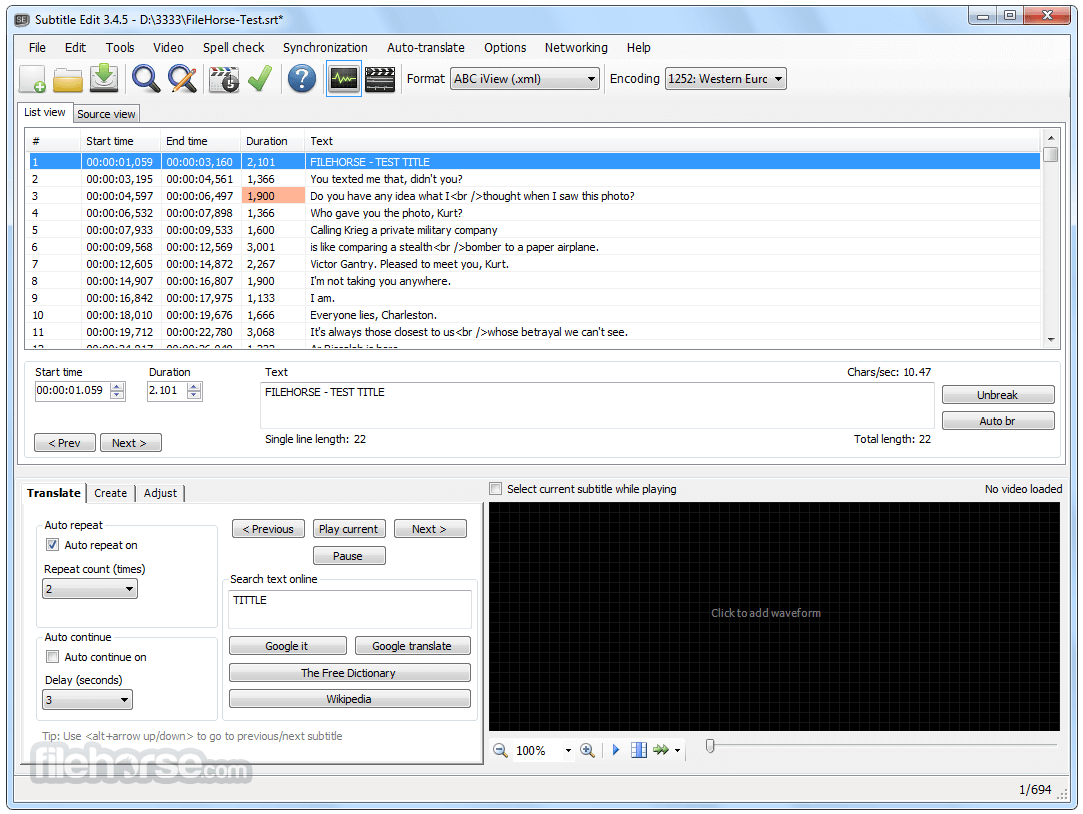
Audio Waveform and Spectrogram View: Helps in aligning subtitles with precise audio peaks.
Automatic Speech Recognition (ASR): Allows transcription from video using speech-to-text services.
Real-Time Spell Checking: Ensures subtitles are grammatically correct and free of typos.
Built-in Translation Tools: Helps translate subtitles directly within the software using third-party services.
Subtitle Synchronization Tools: Adjust timing with shift, scale, or visual sync methods.
OCR for DVD Subtitles: Extract and convert image-based subtitles to text from VobSub/IDX or SUP files.
User Interface
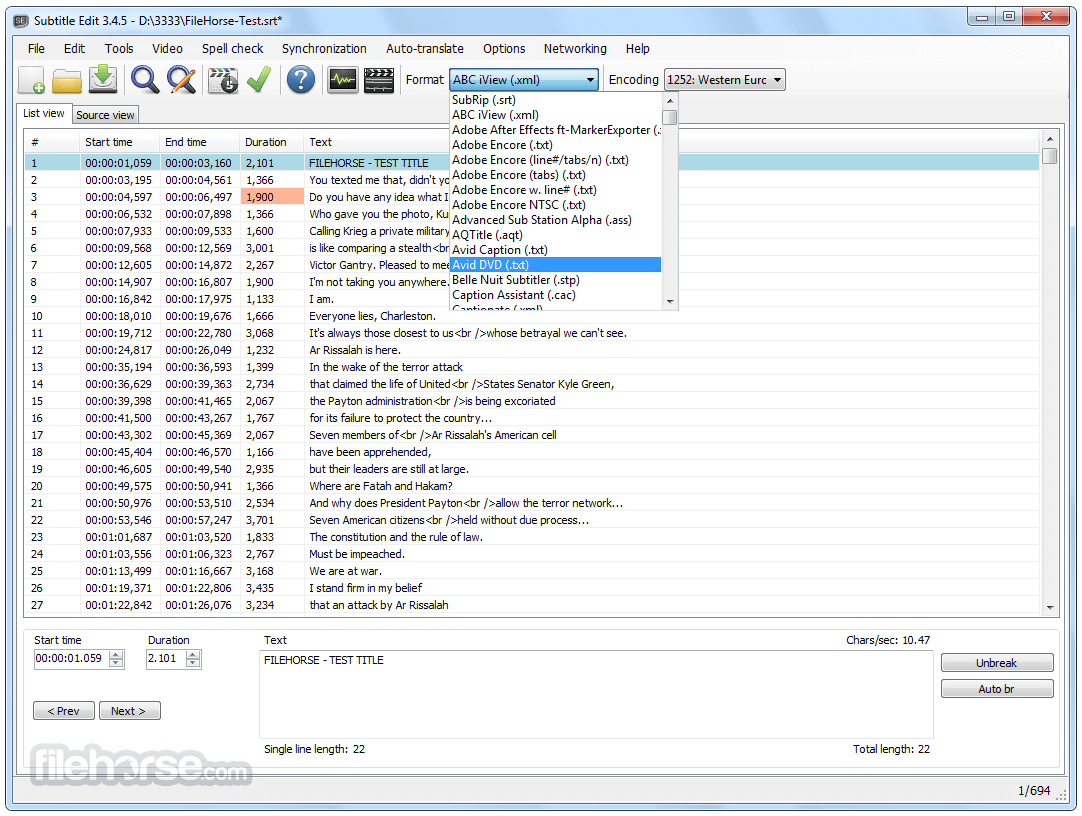
The UI is clean and utilitarian, offering a multi-pane layout. The top section lists subtitles with their corresponding timecodes, while the bottom panels offer video previews, waveform views, and text input.
Toolbars provide quick access to editing, timing, and translation tools.
The interface is easy to navigate and highly customizable, making it suitable for both beginners and advanced users.
Installation and Setup
- Download the installer from the official website or FileHorse.
- Run the installer and follow the prompts.
- Launch the software and configure video player and spell checker options during the initial setup.
- Launch Subtitle Edit and open a video file.
- Load an existing subtitle or create a new one.
- Play the video and pause at the point you want a subtitle to appear.
- Enter the subtitle text and adjust the start and end times.
- Repeat the process for all lines, then save the subtitle file in your desired format.
- Create, edit, sync, and translate subtitle lines.
- Built-in audio visualizer with waveform and spectrogram display.
- Video playback powered by mpv, DirectShow, or VLC.
- Visually adjust subtitle timing, speed, and position.
- Convert audio to subtitles using Whisper or Vosk/Kaldi speech recognition.
- Translate subtitles automatically via Google Translate.
- Extract subtitles from decrypted DVDs.
- Import and OCR VobSub (sub/idx) binary subtitles.
- OCR Blu-ray .sup files (based on BDSup2Sub Java code).
- Load subtitles embedded in MKV files.
- Open subtitles from MP4/M4V (text, captions, VobSub).
- OCR XSub subtitles in DivX/AVI containers.
- OCR DVB and teletext subtitles from TS/M2TS files.
- OCR Blu-ray subtitles from M2TS files.
- Supports UTF-8, Unicode, and ANSI encodings for multilingual use.
- Sync tools: delay, anchor point, or align with another subtitle.
- Merge/split subtitle lines; adjust timing; fix errors.
- Spellcheck with LibreOffice dictionaries; supports many languages.
- Remove hearing-impaired text; renumber lines.
- Add effects like karaoke and typewriter.
- Full undo/redo history.
- Compare subtitles, batch search/replace, fix casing.
- Optimize line length and export to formats like PNG, SUP, STL, and more.
- Supports 300+ subtitle formats including SubRip (.srt), making it highly versatile.
- Compatible with broadcast and editing formats like ABC iView, Adobe Encore, and Avid.
- Handles both text and binary formats such as CapMaker Plus and PAC files.
- Works with D-Cinema formats, including both Interop and SMPTE standards.
- Supports DVD and Blu-ray subtitles like VobSub (.sub/.idx) and SUP (.sup).
- Reads and writes XML-based subtitles including TTML/DFXP and BDN XML.
- Allows import/export of web formats like WebVTT, YouTube SBV, and Annotations.
- Supports legacy formats such as SubViewer, MicroDVD, and SAMI (.smi).
- Can read subtitle streams directly from video containers like MKV and MP4.
- Compatible with CSV and JSON formats for integration with custom tools.
Is Subtitle Edit free to use?
Yes, it is completely free and open-source.
Can I use Subtitle Edit to create subtitles from scratch?
Absolutely. It supports creating and syncing subtitles manually or using audio waveforms.
Does it support translation?
Yes, built-in translation tools can assist with subtitle translation.
Can I preview subtitles with video playback?
Yes, Subtitle Edit integrates with video players for real-time preview.
Is there a portable version?
Yes, a portable version is available for use without installation.
Alternatives
Aegisub - Free open-source tool for creating and modifying subtitles.
Subtitle Workshop - Free software for creating, editing and converting text-based subtitle files.
System Requirements
- OS: Windows 11, 10, 8 or 7
- RAM: 2 GB minimum
- Storage: 100 MB available space
- Video player: VLC or MPC-HC for preview integration
- Free and open-source
- Supports a wide range of formats
- Powerful syncing tools and waveform editor
- Video and audio integration
- Portable version available
- Limited support for macOS
- Some tools require a learning curve
Subtitle Edit is one of the most powerful free subtitle editors available for Windows. Whether you're correcting timing, translating subtitles, or starting from scratch, it delivers a full-featured experience without the need for a premium license. With a balance of ease-of-use and advanced tools, it's a go-to choice for editors, translators, and media creators alike.
Note: Requires .NET Framework.
-
Subtitle Edit 5.0.0 Screenshots
The images below have been resized. Click on them to view the screenshots in full size.
-

-
-

-

What's new in this version:
- Subtitle Edit 5 is a major new release and a big step for the project. For the first time, Subtitle Edit runs natively on Windows, macOS, and Linux from a single, modern, cross-platform codebase. The builds are self-contained, so no separate .NET installation is required, and on macOS and Linux the needed media components (mpv/ffmpeg) are bundled in.
- Please read before upgrading:
- Subtitle Edit 5 is a new application, not just an update of Subtitle Edit 4. It has been rebuilt from the ground up to be cross-platform, so:
- It is not 100% the same app. The look, layout, and some workflows have changed. Some things are in different places, and a few behave differently than in SE4.
- Not every SE4 feature exists in SE5 yet. SE5 covers all the core editing, conversion, sync, video playback, OCR, and online services, but some of the more specialized SE4 tools are not available yet. Features will continue to be added.
- If you rely on a specific SE4 feature that is missing, please keep SE4 installed alongside SE5. The easiest way to run both side by side is to use the Portable versions of SE4 and SE5, which keep their settings separate and do not interfere with each other.
- Which version should I use?
- Subtitle Edit 5: recommended for most users on Windows 10 (22H2) or newer, macOS 12+, and Linux.
- Subtitle Edit 4: please continue to use SE4 if you are on an older Windows version (Windows 7/8), or on older / slower computers where SE5 may not run well. SE4 remains available and is the right choice in those cases.
- To run SE4 and SE5 at the same time, use the Portable versions - you can try SE5 while keeping SE4 as a fallback.
- Feedback is welcome on the issue tracker - it directly helps prioritize what comes next. Thank you to everyone who has supported and contributed to Subtitle Edit over the years.
 OperaOpera 132.0 Build 5905.102 (64-bit)
 LDPlayerLDPlayer - Android Emulator
 PhotoshopAdobe Photoshop CC 2026 27.7 (64-bit)
 BlueStacks AIBlueStacks AI
 GTA 6GTA 6 for PS5
 CapCutCapCut Desktop 8.7.0
 PC RepairPC Repair Tool 2026
 Hero WarsHero Wars - Online Action Game
 TradingViewTradingView - Trusted by 100 Million Traders
 Forza HorizonForza Horizon 6
Comments and User Reviews