




 Genspark AI
 Transkriptor
 PDFelement
 BookFab
 Accio Work
 Wispr Flow
 Adobe Acrobat
 Day One
-
Latest Version
Ultimaker Cura 5.13.0 LATEST
-
Review by
-
Operating System
Windows 10 (64-bit) / Windows 11
-
User Rating
Click to vote -
Author / Product
-
Filename
UltiMaker-Cura-5.13.0-win64-X64.exe
Cura for PC is a powerful, open-source 3D printing software designed to streamline the process of preparing 3D models for printing. Developed by Ultimaker, a leading manufacturer of 3D printers, it offers a wide range of features aimed at both beginners and advanced users alike. It supports a variety of 3D printers and provides users with tools for slicing, optimizing, and previewing their prints.
At the heart of Cura is its powerful, open-source slicing engine, built through years of expert in-house development and user contributions. If you own a 3D printer, software matters. Get the most from your printer with software designed to suit your workflow. Manufacturing doesn’t need to be complicated.
Trusted by millions of users across 20 languages, Cura slices your model and integrates with any workflow through Marketplace plugins. Then scale production and digital distribution with Ultimaker Cloud.
Ultimaker offers the widest material choice on the market. Through Material Alliance, choose the perfect filament for your application – from advanced polymers to carbon fiber composites.
Highlights
- Instant Intent Profiles: Effortlessly access specific applications with a single click.
- Reliable Recommendations: Tested extensively for thousands of hours to ensure dependable results.
- Customizable Control: Explore over 400 settings in 'Custom Mode' for precise adjustments.
- Continuous Improvement: Benefit from regular updates that enhance features and streamline printing experience.
- Quick Setup: Prepare your 3D model for printing within minutes using recommended settings.
- Easy Configuration: Simply select speed and quality settings to initiate printing.
- Free and Open Source: UltiMaker Cura is freely available and open source, empowering users with accessibility.
- Seamless Compatibility: Integration with all UltiMaker products ensures a smooth workflow.
- CAD Plugin Support: Seamlessly integrate with SolidWorks, Siemens NX, Autodesk Inventor, and more.
- Versatile File Compatibility: Supports various file types including STL, OBJ, X3D, 3MF, BMP, GIF, JPG, and PNG.
- Material Profiling: Access material profiles from leading brands tailored for specific applications.
- Third-Party Material Support: Easily utilize third-party materials without manual setup.
- Plugin Repository: Expand functionality with community-rated plugins, enhancing the print preparation experience.
- Slicing Engine: It boasts a robust slicing engine that converts 3D models into printable G-code files efficiently.
- Customizable Settings: Users have access to a plethora of customizable settings, allowing them to fine-tune parameters such as layer height, infill density, and print speed to achieve optimal print results.
- Built-in Profiles: The software comes with pre-configured profiles for a wide range of 3D printers, simplifying the setup process for users.
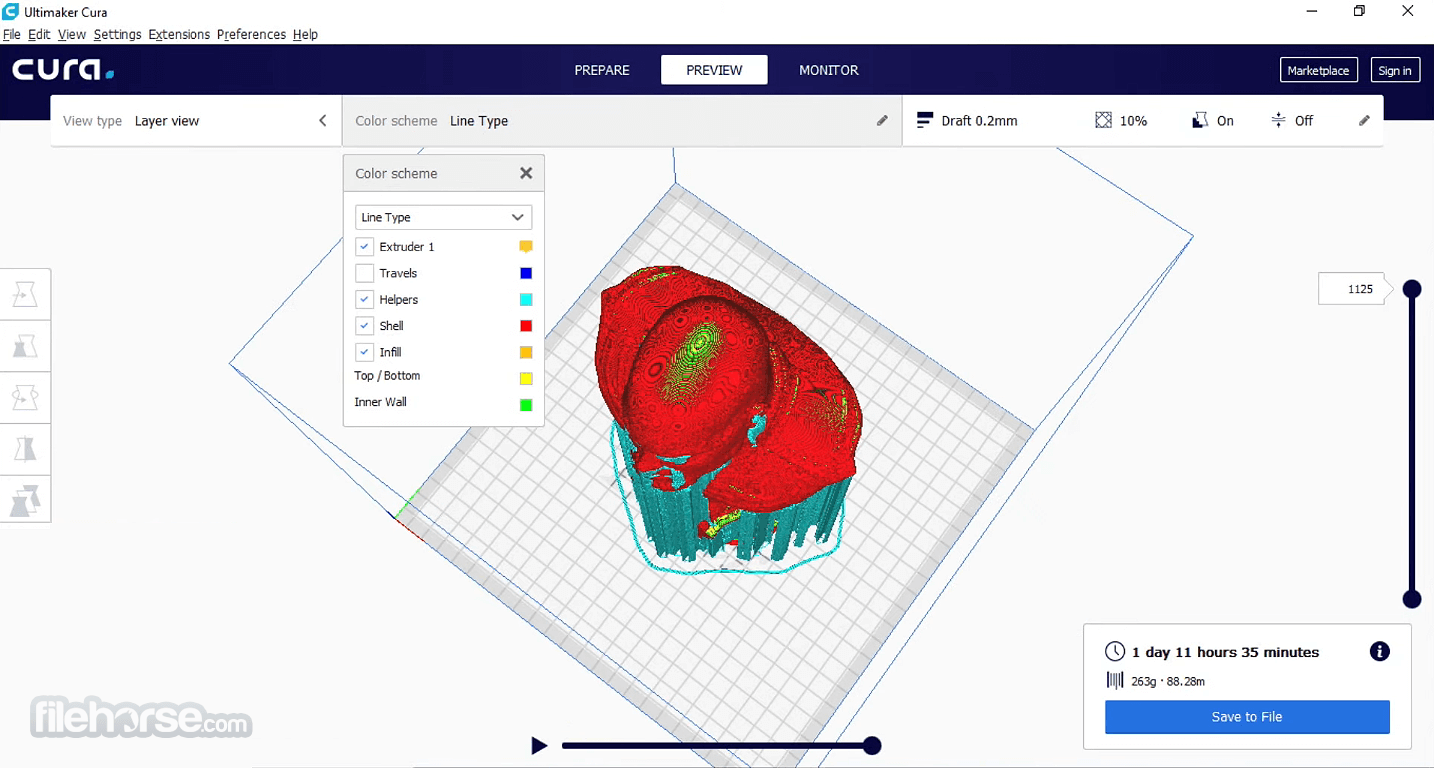
- Print Preview: It offers a comprehensive print preview feature, enabling users to visualize their prints layer by layer before sending them to the printer.
- Plugin Support: Users can extend the functionality of Cura through a variety of plugins, adding features such as additional print optimization algorithms and advanced toolpaths.
It features a clean and intuitive user interface, with easy access to all major functions and settings. The main workspace provides a clear view of the 3D model and offers intuitive tools for manipulating and positioning objects. The toolbar offers quick access to slicing settings, print preview, and other essential features, making it easy for users to navigate the software.
Installation and Setup
Installing this program is a straightforward process. Users can download the software from the official Ultimaker website and follow the on-screen instructions to install it on their PC. Once installed, users can select their 3D printer from a list of supported models and configure any additional settings as needed.
How to Use
- Import Model: Start by importing your 3D model into this app.
- Slice Settings: Adjust slicing settings according to your preferences and print requirements.
- Preview Print: Preview the sliced model to ensure everything looks as expected.
- Save or Print: Save the G-code file to an SD card or send it directly to your 3D printer for printing.
Can Ultimaker Cura support my 3D printer?
It supports a wide range of 3D printers, including models from major manufacturers such as Ultimaker, Prusa, Creality, and more. You can check the list of supported printers on the Ultimaker website.
Is Ultimaker Cura compatible with macOS and Linux?
Yes, Ultimaker Cura is compatible with Windows, macOS, and Linux operating systems, ensuring accessibility for users regardless of their preferred platform.
Can I customize print settings in Ultimaker Cura for PC?
Absolutely! it offers extensive customization options, allowing users to adjust parameters such as layer height, infill density, print speed, and more to achieve desired print quality.
Are there any tutorials available for beginners?
Yes, Ultimaker provides comprehensive tutorials and documentation to help users get started with this software, covering everything from basic setup to advanced printing techniques.
Can I use plugins with Ultimaker Cura to extend its functionality?
Yes, it supports plugins that allow users to add additional features and capabilities to the software, such as new print optimization algorithms and advanced toolpaths.
Alternatives
PrusaSlicer: PrusaSlicer is a popular slicing software developed by Prusa Research, known for its robust features and user-friendly interface.
OctoPrint: OctoPrint is a free and open-source 3D printing host software that offers remote monitoring and control capabilities.
Slic3r: Slic3r is an open-source slicing software known for its speed and reliability, offering a range of features for optimizing print quality.
Simplify3D: Simplify3D is a premium slicing software known for its advanced capabilities and extensive customization options.
Pricing
Ultimaker Cura is available as a FREE download, making it accessible to users of all budgets. There are no subscription fees or hidden costs associated with the software, making it an attractive option for hobbyists and professionals alike.
Minimum system requirements
- Operating System: Windows 7/8/10/11
- OpenGL 2 compatible graphics card, OpenGL 4.1 for 3D layer view
- Display resolution 1024 x 768
- Intel Core 2 or AMD Athlon 64
- 550 MB available hard disk space
- 4GB RAM memory
- Operating System: Windows 7/8/10/11
- OpenGL 4.1 compatible graphics card for 3D layer view
- Display resolution 1920 x 1080
- Intel Core i3 or AMD Athlon 64
- Not all Intel integrated graphics support OpenGL 4.1 or higher.
- 600 MB available hard disk space
- 8GB RAM memory
- Intuitive user interface
- Extensive customization options
- Wide range of supported 3D printers
- Comprehensive print preview feature
- Active community and plugin support
- Some advanced features may be overwhelming for beginners
- Occasional stability issues reported by users
- Limited support for dual extrusion printing
It stands out as a powerful and versatile Windows 3D printing software, offering a plethora of features and customization options to meet the needs of both beginners and advanced users. Its intuitive user interface, extensive printer support, and active community make it a top choice for enthusiasts and professionals alike.
While it may have some minor drawbacks, such as occasional stability issues, its overall performance and feature set make it a standout option in the realm of 3D printing software. Whether you're just starting out or looking to take your 3D printing to the next level, Ultimaker Cura is definitely worth considering.
Also Available: Download Cura for Mac
-
Ultimaker Cura 5.13.0 Screenshots
The images below have been resized. Click on them to view the screenshots in full size.

-

-

-

-
What's new in this version:
New features and improvements:
- Added the new UltiMaker Factor 4+ printer, including profiles
- Added option to specify file association during the installation of Cura for windows
New Settings:
- Introduced Infill Start/End Preference settings that give control over the starting location of infill
- Added Support Infill option "Lightning", and in addition the following supporting settings: Support Lightning Angle, Support Lightning Overhang Angle, Support Lightning Prune Angle, and Support Lightning Straightening Angle, which together allow you to add and control lightning infill generated for support structures
- The Support Infill Line Multiplier has been introduced to increase the quantity of infill lines. When an even number of lines is specified through this setting and paired with lightning support, it produces a single extrusion line for each island
- Introduced Minimum Hole Area in Brim Support, which filters out small holes in the support brim, resulting in a more consistent brim
- Added Temperature Delta Top Surface, which allows you to print top surfaces at a different temperature
- Added more options to Retract Before Outer Wall to give more control over retraction behavior when traveling to the outer wall
- Added Initial Layer Wall Ordering which gives control over the order in which the walls are printed for the initial layer
Fixed:
- Support blockers now function correctly even when assigned to a disabled extruder; they no longer cause slicing conflicts and continue to effectively block support
- Fixed an issue where thin support structures would be generated within tree support
- Fixed an issue where the tree support interface layer would be missing
- Randomized infill now also works for infill skin support
- Fixed an issue where Keep or Discard profile user preference would be ignored
- Overhanging wall speed was previously applied too aggressively, resulting in extremely slow printing in overhanging areas
- Travel speed was applied to layer switches, resulting in high-speed Z-travels
- Fixed an issue where certain 3MF files would incorrectly load with an invalid setting configuration
- Fixed an issue where certain setting combinations would skip parts of the skin and walls sections
- Resolved an issue where slicing would fail when both Raft build plate adhesion and Support Lightning Infill were enabled
- Fixed an issue where overhang speed would be applied inconsistently when both Split Infill and Overhang Speed settings were enabled
- Fixed an issue where the profile has changes notification would overlap with UI elements
- Fixed an issue where certain setting configurations would cause a large amount of small line segments to be generated for the prime tower
- Fixed an issue where clicking the "Sign in to Digital Factory" button twice would fail to log in
Printer definitions, profiles and materials:
- Updated high-speed S-Line profiles to improve tree support strength and improved seam behavior by ending infill close to the seam and traveling to the seam unretracted
- Improved material detection for Method line printers to automatically select support material for the raft interface
- Automatically disable Infill Skin Support if Gradual Infill Steps is enabled, since these are conflicting settings
 OperaOpera 134.0 Build 5954.66 (64-bit)
 BlueStacksBlueStacks 10.42.255.1002
 PhotoshopAdobe Photoshop CC 2026 27.9.1 (64-bit)
 LDPlayerLDPlayer - Android Emulator
 GTA 6GTA 6 for PS5
 CapCutCapCut Desktop 9.1.0
 PC RepairPC Repair Tool 2026
 Hero WarsHero Wars - Online Action Game
 TradingViewTradingView - Trusted by 100 Million Traders
 Halo: CampaignHalo: Campaign Evolved
Comments and User Reviews