




 Replit
 10Web
10Web Cursor
 SQL Server
 OnSpace AI
 Antigravity
 Windsurf
 Lovable
-
Latest Version
OpenCV 5.0.0 LATEST
-
Review by
-
Operating System
Windows 7 / Windows 8 / Windows 10 / Windows 11
-
User Rating
Click to vote -
Author / Product
-
Filename
opencv-5.0.0-windows.exe
OpenCV (Open Source Computer Vision Library) is an open-source software library designed for real-time computer vision and machine learning applications.
Originally developed by Intel, OpenCV has grown into one of the most widely used frameworks for image processing, object detection, facial recognition, and deep learning tasks.
It provides a robust and efficient platform for developers, researchers, and engineers working in fields such as robotics, augmented reality, surveillance, and medical imaging.
Key Features
Extensive Computer Vision Capabilities – Offers a vast range of image processing techniques, including edge detection, segmentation, and feature extraction.
Machine Learning Integration – Supports deep learning models via frameworks like TensorFlow, PyTorch, and Caffe.
Multi-Language Support – Works with Python, C++, Java, and MATLAB, making it versatile for developers.
Cross-Platform Compatibility – Runs on Windows, Linux, macOS, iOS, and Android.
Optimized for Performance – Utilizes hardware acceleration via OpenCL, CUDA, and Intel’s MKL.
Video Processing – Features real-time video capture, processing, and motion detection.
3D Reconstruction – Offers tools for depth estimation, stereo vision, and point cloud generation.
Augmented Reality and Facial Recognition – Provides functionalities for AR applications and biometric identification.
User Interface
Since OpenCV is a library, it does not have a traditional graphical user interface (GUI).
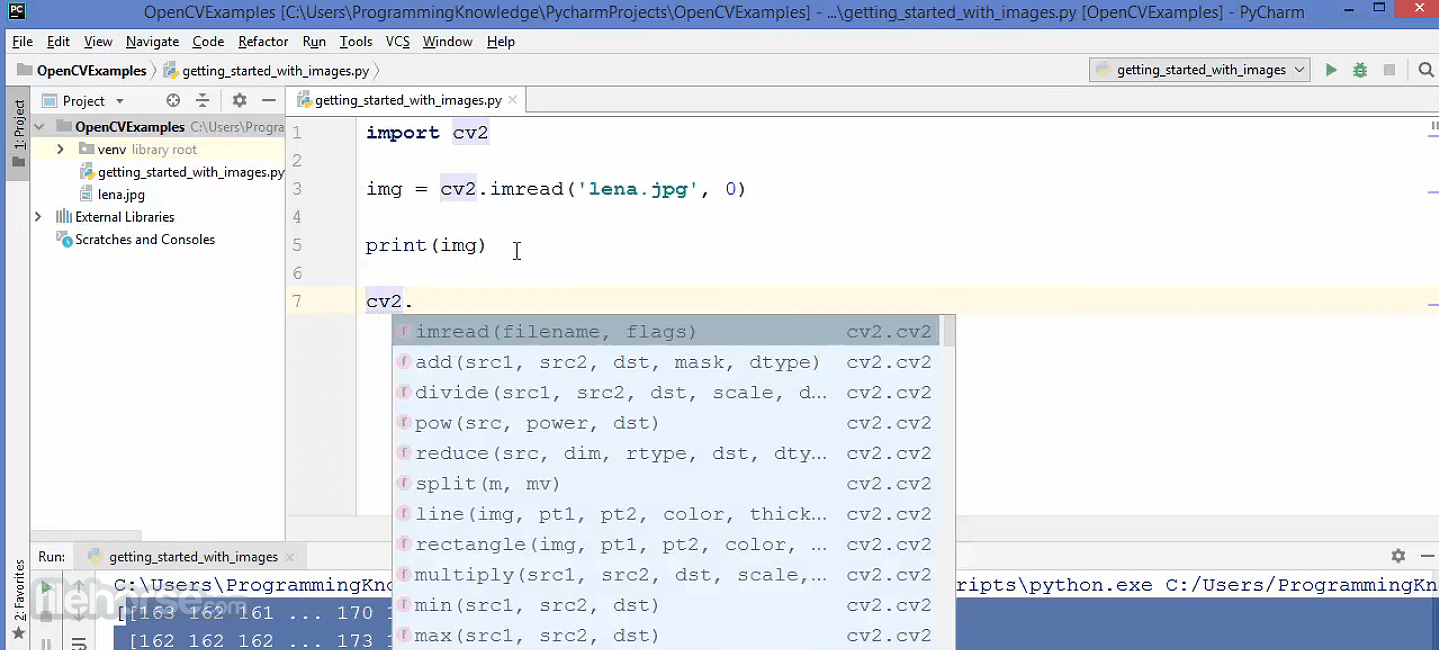
Instead, it is used via command-line interfaces and integrated into development environments such as Visual Studio, PyCharm, and Jupyter Notebook.
Various wrapper libraries, such as OpenCV GUI (Qt-based) and OpenCV-Python, enable visualization of image and video processing tasks.
Installation and Setup
Building from Source:
Is OpenCV free?
Yes, OpenCV is open-source and licensed under Apache 2.0, meaning it's free for both personal and commercial use.
What programming languages does OpenCV support?
It supports C++, Python, Java, and MATLAB, making it accessible for a wide range of developers.
Can OpenCV be used with deep learning models?
Yes, it integrates with TensorFlow, PyTorch, and Caffe for deep learning applications.
Does OpenCV support GPU acceleration?
Yes, it supports CUDA, OpenCL, and Vulkan for GPU acceleration.
What industries use OpenCV?
OpenCV is used in healthcare, robotics, security, automotive, and entertainment industries for tasks like facial recognition, autonomous driving, and AR applications.
System Requirements
OpenCV remains one of the most powerful and versatile tools for computer vision and machine learning applications on Windows. While it may not be the most user-friendly option for beginners, it offers unparalleled flexibility and performance for developers working on AI-driven image processing projects.
With its strong community support, cross-platform functionality, and continuous improvements, OpenCV is an essential tool for anyone involved in computer vision.
Also Available: Download OpenCV for Mac
Originally developed by Intel, OpenCV has grown into one of the most widely used frameworks for image processing, object detection, facial recognition, and deep learning tasks.
It provides a robust and efficient platform for developers, researchers, and engineers working in fields such as robotics, augmented reality, surveillance, and medical imaging.
Key Features
Extensive Computer Vision Capabilities – Offers a vast range of image processing techniques, including edge detection, segmentation, and feature extraction.
Machine Learning Integration – Supports deep learning models via frameworks like TensorFlow, PyTorch, and Caffe.
Multi-Language Support – Works with Python, C++, Java, and MATLAB, making it versatile for developers.
Cross-Platform Compatibility – Runs on Windows, Linux, macOS, iOS, and Android.
Optimized for Performance – Utilizes hardware acceleration via OpenCL, CUDA, and Intel’s MKL.
Video Processing – Features real-time video capture, processing, and motion detection.
3D Reconstruction – Offers tools for depth estimation, stereo vision, and point cloud generation.
Augmented Reality and Facial Recognition – Provides functionalities for AR applications and biometric identification.
User Interface
Since OpenCV is a library, it does not have a traditional graphical user interface (GUI).
Instead, it is used via command-line interfaces and integrated into development environments such as Visual Studio, PyCharm, and Jupyter Notebook.
Various wrapper libraries, such as OpenCV GUI (Qt-based) and OpenCV-Python, enable visualization of image and video processing tasks.
Installation and Setup
Building from Source:
- Install CMake, Visual Studio, and Ninja.
- Configure using CMake, enabling CUDA or OpenCL if necessary.
- Compile and integrate with Python or C++.
Is OpenCV free?
Yes, OpenCV is open-source and licensed under Apache 2.0, meaning it's free for both personal and commercial use.
What programming languages does OpenCV support?
It supports C++, Python, Java, and MATLAB, making it accessible for a wide range of developers.
Can OpenCV be used with deep learning models?
Yes, it integrates with TensorFlow, PyTorch, and Caffe for deep learning applications.
Does OpenCV support GPU acceleration?
Yes, it supports CUDA, OpenCL, and Vulkan for GPU acceleration.
What industries use OpenCV?
OpenCV is used in healthcare, robotics, security, automotive, and entertainment industries for tasks like facial recognition, autonomous driving, and AR applications.
System Requirements
- OS: Windows 10 or Windows 11
- Processor: Intel or AMD 64-bit CPU
- RAM: Minimum 4GB (8GB+ recommended)
- Storage: ~1GB for the base library; more for additional models and dependencies
- GPU: Optional, but NVIDIA CUDA-supported GPUs can improve performance
- Free and open-source with an active community.
- Extensive features for image processing, video analysis, and AI.
- High performance with GPU acceleration.
- Compatible with multiple programming languages.
- Works on various platforms including Windows, Linux, and macOS.
- No built-in GUI, making it challenging for beginners.
- Requires coding knowledge to utilize fully.
- Some features have a steep learning curve.
- GPU acceleration setup can be complex.
- Lacks official technical support (community-driven help only).
OpenCV remains one of the most powerful and versatile tools for computer vision and machine learning applications on Windows. While it may not be the most user-friendly option for beginners, it offers unparalleled flexibility and performance for developers working on AI-driven image processing projects.
With its strong community support, cross-platform functionality, and continuous improvements, OpenCV is an essential tool for anyone involved in computer vision.
Also Available: Download OpenCV for Mac
Why is this app published on FileHorse? (More info)
-
OpenCV 5.0.0 Screenshots
The images below have been resized. Click on them to view the screenshots in full size.

-

-
-

 OperaOpera 133.0 Build 5932.60 (64-bit)
 BlueStacksBlueStacks 10.42.251.1002
 PhotoshopAdobe Photoshop CC 2026 27.7 (64-bit)
 WPS OfficeWPS Office Free 12.2.0.23196
 GTA 6GTA 6 for PS5
 CapCutCapCut Desktop 9.1.0
 PC RepairPC Repair Tool 2026
 Hero WarsHero Wars - Online Action Game
 TradingViewTradingView - Trusted by 100 Million Traders
 Halo: CampaignHalo: Campaign Evolved
Comments and User Reviews