




 Windsurf
 SQL Server
 OnSpace AI
 Lovable
 Replit
 Cursor
 10Web
10Web Antigravity
-
Latest Version
HeidiSQL 12.21.0.7344 LATEST
-
Review by
-
Operating System
Windows 7 64 / Windows 8 64 / Windows 10 64 / Windows 11
-
User Rating
Click to vote -
Author / Product
-
Filename
HeidiSQL_12.21.0.7344_Setup.exe
-
MD5 Checksum
b9d90aab11032cf933a3f1b4ed9d9ad5
It offers a user-friendly interface that allows developers and database administrators to browse, edit, and execute SQL scripts seamlessly.

Initially developed by Ansgar Becker, HeidiSQL has grown into one of the most popular lightweight database management solutions.
Key Features
Multi-Database Support: It works with MySQL, MariaDB, PostgreSQL, and SQL Server, making it a versatile choice for database management.
Query Editor: A powerful SQL editor with syntax highlighting, auto-completion, and query history.
Data Import/Export: Supports importing and exporting databases in various formats, including CSV, SQL, and XML.
Database Synchronization: Allows synchronization between local and remote databases.
User Management: Provides a graphical user interface for managing user privileges and roles.
Table and Index Management: Enables the creation, modification, and deletion of tables and indexes.
Performance Monitoring: Offers real-time insights into database performance and query execution times.
SSH Tunneling: Securely connects to remote databases using SSH tunneling.
Customizable Interface: Allows users to adjust UI settings, themes, and shortcuts for a personalized experience.
User Interface
The app features a clean and organized interface designed for efficiency. The left-side panel displays the available databases and their respective tables, while the right-side panel provides a query editor and data view.
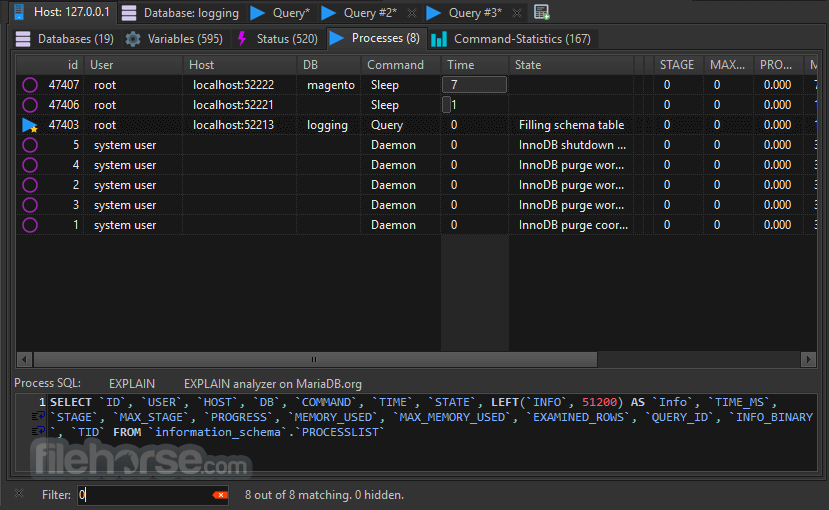
The tabbed interface ensures that users can work on multiple queries simultaneously. Syntax highlighting and query auto-completion make SQL scripting more intuitive.
Installation and Setup
- Download the latest version from the official website or FileHorse.
- Run the installer and follow the setup wizard.
- Choose database drivers for MySQL, MariaDB, PostgreSQL, or SQL Server.
- Enter connection details, including hostname, username, password, and database.
- Test the connection and save session settings for future use.
Connect to a Database: Open HeidiSQL and create a new session with the required database credentials.
Browse Databases: Explore database schemas, tables, and views using the left-side navigation panel.
Execute Queries: Write SQL scripts in the editor and run queries with the execution button.

Manage Tables: Add, modify, or delete tables and indexes directly through the GUI.
Export and Import Data: Use the data export/import feature to migrate data between different databases.
FAQs
Is HeidiSQL free to use?
Yes, this software is completely free and open-source.
Does HeidiSQL support remote database connections?
Yes, it allows remote database access via SSH tunneling and direct TCP/IP connections.
Can I use HeidiSQL on macOS or Linux?
No, this program is designed for Windows, but it can run on macOS and Linux using Wine.
Does HeidiSQL support stored procedures?
Yes, it allows users to view, edit, and execute stored procedures.
How does HeidiSQL compare to MySQL Workbench?
HeidiSQL is lighter and faster but lacks some advanced visualization features present in MySQL Workbench.

Alternatives
MySQL Workbench – A more feature-rich tool with data modeling and visualization capabilities.
DBeaver – A multi-platform alternative supporting numerous database systems.
Navicat – A premium database management tool with a robust feature set.
SQLyog – A Windows-based MySQL GUI with enterprise-level features.
Pricing
This tool is 100% free and open-source, making it an excellent choice for developers and database administrators who require a cost-effective solution.
System Requirements
- OS: Windows 7, 8, 10, or 11
- Processor: Intel or AMD 1 GHz or faster
- RAM: 2GB minimum (4GB recommended)
- Storage: 50MB free disk space
- Database Support: MySQL, MariaDB, PostgreSQL, Microsoft SQL Server
- Lightweight and fast compared to other database tools.
- Supports multiple database types.
- Free and open-source with active community support.
- User-friendly interface with syntax highlighting.
- SSH tunneling for secure remote access.
- Only available for Windows (requires Wine for macOS/Linux).
- Lacks advanced visualization tools found in MySQL Workbench.
- Does not support Oracle or other proprietary databases.
- UI design is functional but lacks modern aesthetics.
- Limited built-in reporting features.
HeidiSQL is an excellent choice for developers and database administrators looking for a lightweight, efficient, and free database management tool for Windows. With multi-database support, a powerful SQL editor, and seamless data import/export capabilities, it simplifies database operations while maintaining high performance.
-
HeidiSQL 12.21.0.7344 Screenshots
The images below have been resized. Click on them to view the screenshots in full size.
-
-
-
-

What's new in this version:
Features:
- Create opt-in option for displaying columns in database tree
- Enhance order of items in completion proposal, so exact matches are at the top
- For keyboard navigation on the completion proposal, wrap around the item list
- First attempt to create a user manager for PostgreSQL
- Show index icons on columns in tree, and the data type text color
- Auto-adjust width of various combo boxes
- Show table columns in tree, as child nodes
- Query size of all indexes in one query
- Display size of each index and paint a color bar behind it
- Make custom proposal popup interval effective
- Icons, colors and padding in completion proposal
Fixed:
- (ui) Exchange icon for "column" and its variants for add, delete, edit
- Sporadic crash in DBtreePaintText with columns
- Enable foreign key drop down on grid field in MS SQL mode
- Remove column nodes from tree in table tools dialog
- Empty command line part for sshpass on FreeBSD
- Handle MONEY column types as float
- Hang and wrong check states in data grid column selection on macOS
- Invalid folder path for SQL export cannot be created if it contains a duplicated path delimiter
- Various CVEs regarding libssl and libcrypto
- Context menu does not appear at right-click on a tree node text
- Crash when opening textfile import dialog, with 0 tables in database
- Crash when cancelling session manager while a session rename is active
- Prevent crashes from SetFocus on various controls
- Data grid header keeps showing previous table's columns on macOS
- Prevent SQL error "Property 'MS_Description' already exists"
- Enhance anchors on some of the table editors controls
- Bad width of collation combo box
- File > "New window" does nothing on macOS
- Still wrong proposal background color in dark mode
- Wrong proposal background color in dark mode
- Crash when opening a table, due to using the TCanvas member of a not yet visible form or frame
- Give the trees and grids more height for the header
- Widen many TSpinEditEx instances to either 80px or align them with neighbor controls
- Some trees have their own OnContextMenu logic set at design time, do not overwrite
- Work around unused Header.PopupMenu menu on Linux when a tree has a PopupMenu
- DPI related scale glitches, mainly on completion proposal
- Do not paint size bar in nodes of level 2, and do not show "-" text there neither
- Bad text color for selected item in proposal
- Propose items when editor already contains a leading backtick quote
- Missing support for custom keyboard shortcut for executing completion popup
- Glitches with padding in completion proposal, and non-restored width
- EXPLAIN actions either disabled or non-working for PostgreSQL and SQLite
- Hanging in a loop over result nodes by right-click on query result
- Detect release version string from Lazarus project file, and insert into Contents/Info.plist of macOS bundle
- Crash during refresh on disconnected session
- When parsing the command line, make use of Application.GetOptionValue and friends, instead of ParamStr(x) with regular expressions
- Use default library of connection when the one from a stored session contains an invalid path/file
- Refresh session tree after import per More > Import settings file
- CAS(x AS CHAR) not supported by MySQL below v4.0.2
- Always enable release link label on update check dialog, which points to the general download page
- Prepend database name to the trigger name at the correct position, when newer MariaDB versions use IF NOT EXISTS
Refactor:
- Prefer Delphi friendly SysUtils.PathDelim over System.DirectorySeparator
Performance:
- Avoid full string scans in StrEllipsis
- ?? Miscellaneous Tasks:
- Update SQLite libraries to v3.53.4
- Ignore auto-created IntelliJ project files
- Prefer macos-15 over macos-15-arm64, due to better availability of the Intel runners
- Stick to macOS 15, because the FPC package is only officially qualified up to macOS 11 and uses a package format Apple has tightened in newer releases, so it no longer installs on the macos 26 runners
Cleanup:
- TbsSeparator TToolButton's now seem to have a default width of 8px (was 6px at some point), and TStatusBar's height now has a default height of 23px (was 28px)
Localize:
- Update compiled .mo translation files
 OperaOpera 135.0 Build 5973.133 (64-bit)
 LDPlayerLDPlayer - Android Emulator
 BlueStacksBlueStacks 10.42.265.1001
 MalwarebytesMalwarebytes Premium 5.7.0
 Premiere ProAdobe Premiere Pro CC 2026 26.5
 CapCutCapCut Desktop 9.3.0
 PC RepairPC Repair Tool 2026
 Adobe AcrobatAdobe Acrobat Pro 2026.002.21901
 TradingViewTradingView - Trusted by 100 Million Traders
 WARDOGSWARDOGS - All Out Warfare FPS
Comments and User Reviews