




 WTFast
 4K Download
 RemotePC
 YTD Download
 Streaming
 PRTG
PRTG CleverGet
 Keeprix
-
Latest Version
PuTTY 0.83 (32-bit) LATEST
-
Review by
-
Operating System
Windows 7 / Windows 8 / Windows 10
-
User Rating
Click to vote -
Author / Product
-
Filename
putty-0.83-installer.msi
-
MD5 Checksum
9037248f8c8c8e5f4fcd4af8a4bd8388
PuTTY 32bit is a free and open-source terminal emulator for Windows 11/10 and a network file transfer application. Its primary purpose is to provide a secure and reliable way to establish SSH, Telnet, and serial connections to remote servers and devices.
The tool is renowned for its lightweight nature, cross-platform compatibility, and robust encryption protocols, making it a go-to choice for anyone needing to access remote machines securely.
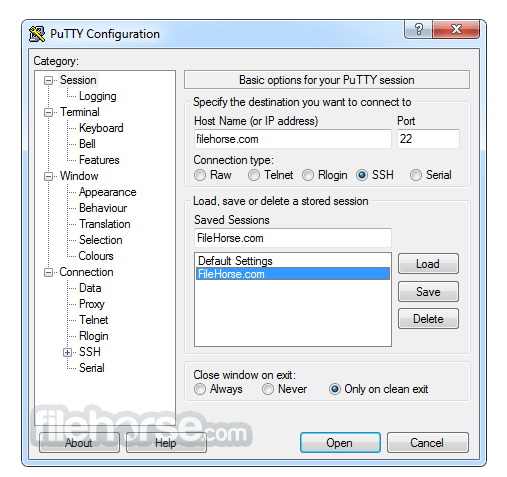
Main Features
SSH, Telnet, and Serial support: It provides support for secure shell (SSH), Telnet, and serial connections, making it versatile for connecting to various types of systems and devices.
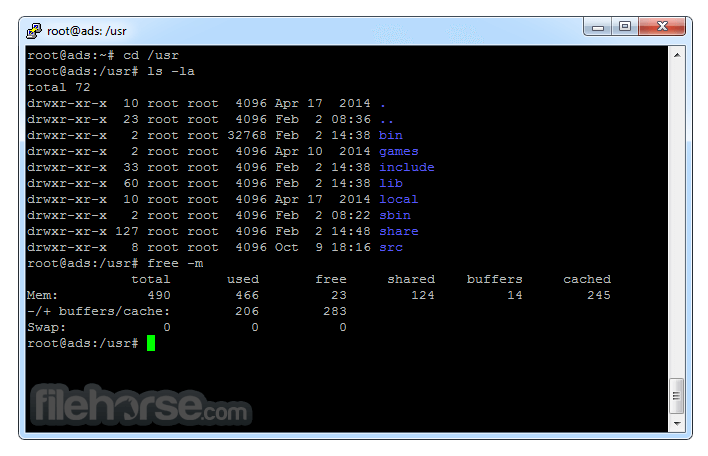
Terminal emulation: It emulates various terminal types, including VT100, VT102, VT220, and xterm, allowing you to work with different systems and applications as if you were using a physical terminal.
Portability: PuTTY is a standalone application and doesn't require installation. You can run it directly from an executable file, making it portable and easy to carry on a USB drive or other storage devices.
Session management: It allows you to save connection details and configurations as sessions, making it convenient to connect to frequently used hosts with specific settings.
Keyboard customization: You can customize keyboard shortcuts, control sequences, and key combinations to suit your preferences and work efficiently within the terminal.
X11 forwarding: It supports X11 forwarding, allowing you to run graphical applications on a remote server and display them on your local system.
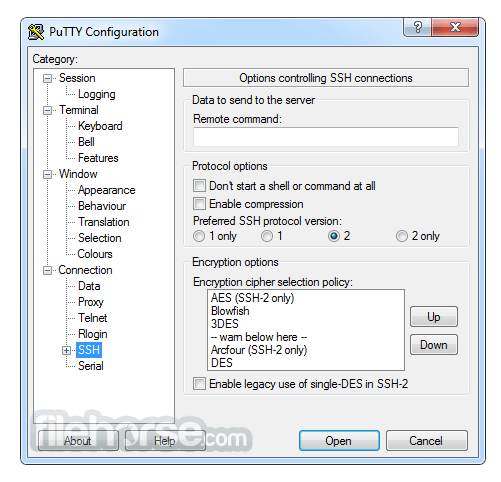
Secure connections: It uses encryption for SSH connections, providing a secure way to access remote systems and protect sensitive data during transmission.
Proxy support: It supports various proxy types (HTTP, SOCKS4, SOCKS5) for tunnelling connections through intermediary servers or firewalls.
SCP and SFTP support: The tool includes command-line tools (PSCP and PSFTP) for securely transferring files between your local system and remote servers using SCP (Secure Copy Protocol) and SFTP (SSH File Transfer Protocol).
SSH key management: PuTTYgen, a companion tool, allows you to generate, import, and manage SSH keys for secure authentication.
Configurability: The software offers extensive options and settings to customize your terminal environment, including text colors, fonts, window size, and behavior.
Multiple terminal windows: You can open multiple terminal windows within a single PuTTY instance, making it easy to multitask and manage multiple connections simultaneously.
UTF-8 support: It supports UTF-8 character encoding, enabling you to work with international character sets and languages.
Scripting and automation: It can be used in batch scripts or automated tasks, allowing you to automate repetitive tasks and interactions with remote systems.
Active development: The program is actively maintained and updated by the open-source community, ensuring compatibility with modern systems and security standards.
This download includes the following tools
- PuTTY (the Telnet and SSH client itself)
- PSCP (an SCP client, i.e. command-line secure file copy)
- PSFTP (an SFTP client, i.e. general file transfer sessions much like FTP)
- PuTTYtel (a Telnet-only client)
- Plink (a command-line interface to the PuTTY back ends)
- Pageant (an SSH authentication agent for PuTTY, PSCP, and Plink)
- PuTTYgen (an RSA and DSA key generation utility).
What is PuTTY used for?
PuTTY is a free and open-source SSH and Telnet client primarily used to establish secure remote connections to servers, network devices, and other systems. It is widely used by system administrators and developers to manage Linux/Unix servers from Windows machines.
Is PuTTY secure for remote connections?
Yes. PuTTY supports SSH (Secure Shell), which encrypts communication between your computer and the remote server. When configured properly with key-based authentication, it provides a secure method for remote access and server management.
Does PuTTY require installation?
PuTTY is available both as a standard installer and as a standalone executable. The portable version can run without installation, making it convenient for technicians or users who need quick remote access without modifying the system.
Is PuTTY still relevant in 2026?
Yes. In 2026, PuTTY remains widely used due to its lightweight design, reliability, and open-source nature. Although modern alternatives exist, PuTTY continues to be a trusted tool for SSH connections, especially on Windows systems.
Alternatives
SecureCRT - A commercial terminal emulator with advanced features, including scripting and session management.
MobaXterm - A feature-rich terminal emulator and SSH client for Windows with built-in X11 support and remote desktop capabilities.
ZOC Terminal - Professional SSH, Telnet, Serial/Modem Terminal Emulator
PROS
- Free and open-source.
- Secure SSH and Telnet connections.
- Lightweight and resource-efficient.
- Cross-platform compatibility.
- Active community and regular updates.
- Versatile with scripting and automation capabilities.
- Basic user interface without advanced features.
- Limited to terminal emulation and network connections.
- May require additional tools for file transfers and other tasks.
-
PuTTY 0.83 (32-bit) Screenshots
The images below have been resized. Click on them to view the screenshots in full size.
-

-

-
-
What's new in this version:
- Support for ML-KEM, the NIST-standardised post-quantum key exchange mechanism. (In addition to NTRU Prime, which has been supported since 0.78.)
- Support for full Unicode file names in Windows file selector dialogs. (However, these do not yet round-trip through a saved session.)
Fixed:
- psftp -b works again
- assertion failure if an SSH connection times out at the login prompt
- crash in Pageant if an SSH connection is abandoned while waiting for a deferred decryption passphrase
- tight loop if PuTTY tried to send an empty answerback string
- accidental truncation of some configuration edit boxes' contents to 127 characters
- Windows XP support was accidentally broken, and now reinstated
- restored interoperation with third-party tools that auto-fill login prompts by sending ^M for Return
- confusion when terminal window resized by tools like FancyZones
- the small keypad keys didn't reliably work in the terminal on Unix
 OperaOpera 129.0 Build 5823.15 (64-bit)
 Kling AIKling AI - Text or Image to Video
 PhotoshopAdobe Photoshop CC 2026 27.4 (64-bit)
 BlueStacksBlueStacks 10.42.167.1001
 OKXOKX - Buy Bitcoin or Ethereum
 CapCutCapCut 7.9.0
 PC RepairPC Repair Tool 2026
 Hero WarsHero Wars - Online Action Game
 TradingViewTradingView - Trusted by 100 Million Traders
 AdGuard VPNAdGuard VPN 2.9.0
Comments and User Reviews